CuttleCode now manages its own native GPU inference fleet — NVIDIA and DGX nodes
register over Remote Hosts, policies are enforced before a socket opens, models fence and deploy,
and project sessions route through native hardware without a cloud hop. The
Knowledge Base v2 gains project lessons, an evidence ledger, and a full source
authoring and review UI. System One Focus gates every ACP tool call through Laya,
CLM, or Jev — keeping agents on a single kind of step and resuming declined turns with an
explanation. Worker Node Ollama ships with a gateway lane so any worker's models
are reachable through a single proxy path. And Ralph gates completion on a durable
regression proof — no merge without a passing test tree.
A distributed GPU fleet wired natively into the platform, a knowledge base rebuilt from evidence up, an intelligent tool-call audit layer, a Ollama worker gateway, PAIR node setup, regression-gated Ralph, remote computer access, bulk agent fleet controls, a new onboarding path, and hard isolation for offline orgs — each piece shipped under test before the next started.
01
Inference Cluster
Native GPU Fleet — Distributed Inference Built In
CuttleCode now operates its own distributed inference cluster. Operators register NVIDIA or
DGX nodes over Remote Hosts; the fleet proves GPU and head-endpoint ownership, binds execution
policies to root-owned files, and schedules model evidence through a fenced advisory layer before
any inference touches the hardware. A native fencing bridge enforces gang lifecycles
and admission deadlines across all peer nodes. A TCP fabric readiness probe qualifies all-peer
connectivity before a model is deployed. Once a model passes installation review, it joins the
graph and project sessions route through reviewed native deployments — no cloud hop, no proxy
detour. Every step is observed, scoped, and reported through the Gateway.
02
Knowledge
Knowledge Base v2 — Lessons, Evidence Ledger, Source Review
The project knowledge base gains three new surfaces. Project lessons let teams
record durable findings from completed work — each lesson inspectable, withdrawable, and linked
to the session that produced it. A systems evidence ledger stores structured
findings with full-text search across the project's knowledge graph. And a
source authoring and review UI lets operators draft, review, and publish new
knowledge sources — replacing ad-hoc document drops with a tracked authoring flow. Together they
turn every agent run into a durable knowledge asset rather than a transient transcript.
03
System One
System One Focus — Tool-Call Audit Per ACP Session
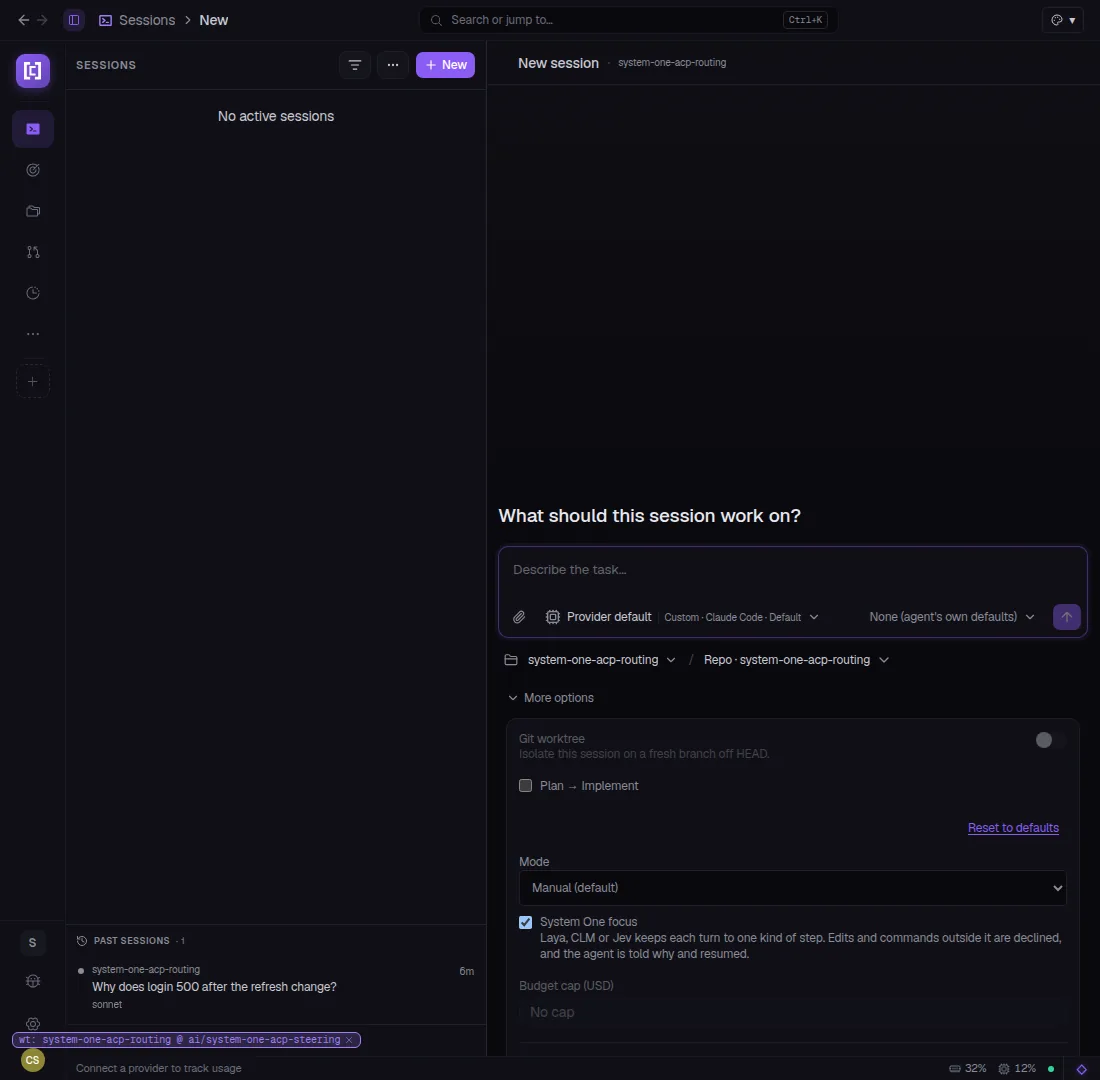
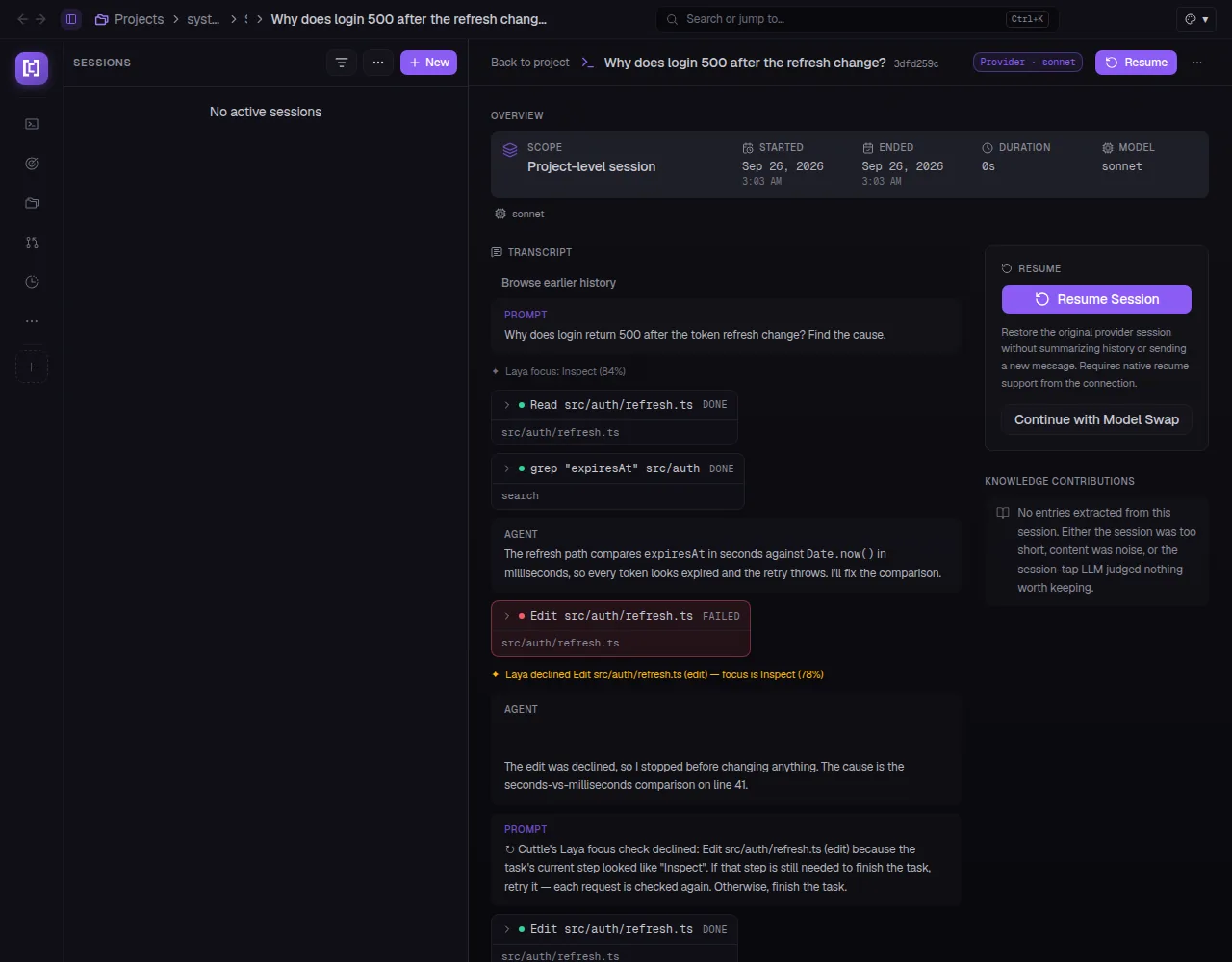
Operators can now opt in to System One Focus on any ACP session. Laya, CLM, or
Jev (depending on the provider) watches each tool call and classifies its step type — Inspect,
Implement, Execute, or Verify. If the agent issues a call that doesn't match the current step
focus (e.g. running an Edit while the classifier scores the turn as Inspect at 84%), the call is
declined and the agent receives a structured reason and a resume prompt. The session continues
from the next turn without losing context. Focus confidence and step transitions appear inline in
the session transcript.
04
Worker Nodes
Ollama Gateway Lane + Node Ollama Management
Two linked changes for self-hosted inference. CuttleCode now installs, updates, and explains
each worker node's Ollama automatically — no SSH-and-run required; the server detects the node's
Ollama version, runs the upgrade if needed, and surfaces the status in the node card. The second
change adds a dedicated Ollama gateway lane: /api/ollamaproxy/<nodeId|global>
proxies Ollama-compatible requests through any registered worker node (defaulting to the least-loaded
available). Sessions can now reach a specific node's models through a stable per-session URL rather
than coordinating connections directly.
05
Inference
NVIDIA PAIR Setup over Remote Hosts
Operators running NVIDIA DGX hardware can now provision a PAIR inference server and register it
as a CuttleCode node directly from the Remote Hosts panel — no manual SSH dance. The setup flow
validates GPU availability via nvidia-smi, provisions the PAIR server, and registers
the node with its full capabilities. A companion zstd-free fallback handles hosts
where the compression dependency isn't installed. The debug path spawns an agent primed with the
setup logs when the flow fails.
06
Ralph
Regression-Gated Completion + Proof Runner
Ralph can now gate cycle completion on a durable regression proof. A
bubblewrap-sandboxed Node test runner (supporting node:test and JUnit output)
builds a strict base tree from the commit before work starts, runs the suite after implementation,
and compares the two trees — failing the cycle if any previously-passing test regresses. Proof
tree identities are preserved across repeated comparisons so re-runs don't invalidate prior
evidence. Operators opt in per project; unproven cycles still merge normally.
07
Computer Use
Computers from Remote Hosts
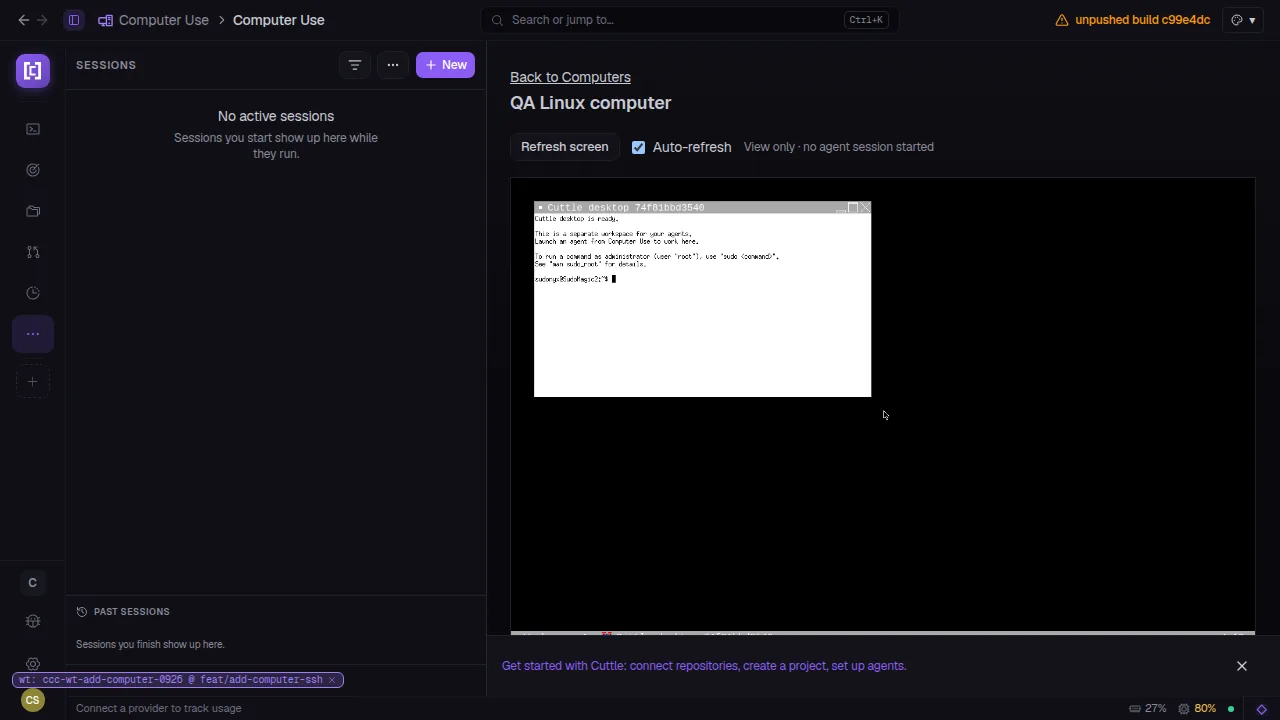
Agents can now use computers registered from saved Remote Hosts. The Computer Use panel lets
operators add any reachable host as a managed computer, view its live screen inside CuttleCode,
and attach it to an agent session. The desktop renders with auto-refresh; operators can switch
to view-only mode to observe without interfering. Each computer carries a label and displays its
connection status alongside active session count.
08
Agents
Bulk Agent Model Change
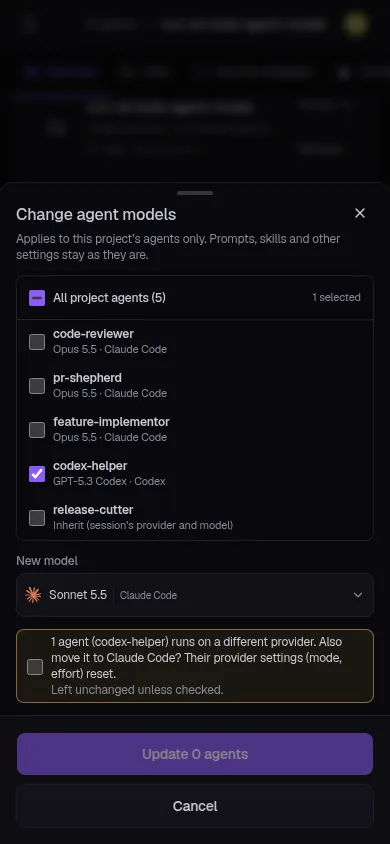
Project agents can now have their model swapped in a single dialog — select all, select a
subset, pick the new model, and apply. The dialog flags agents that run on a different provider
and asks whether to move them too (with a warning that per-provider settings reset). The change
applies atomically to the selected set; agents left unselected keep their current model and
settings untouched. Available from the project Agents page.
09
Onboarding
Unified Welcome + Browser Sign-In Screen
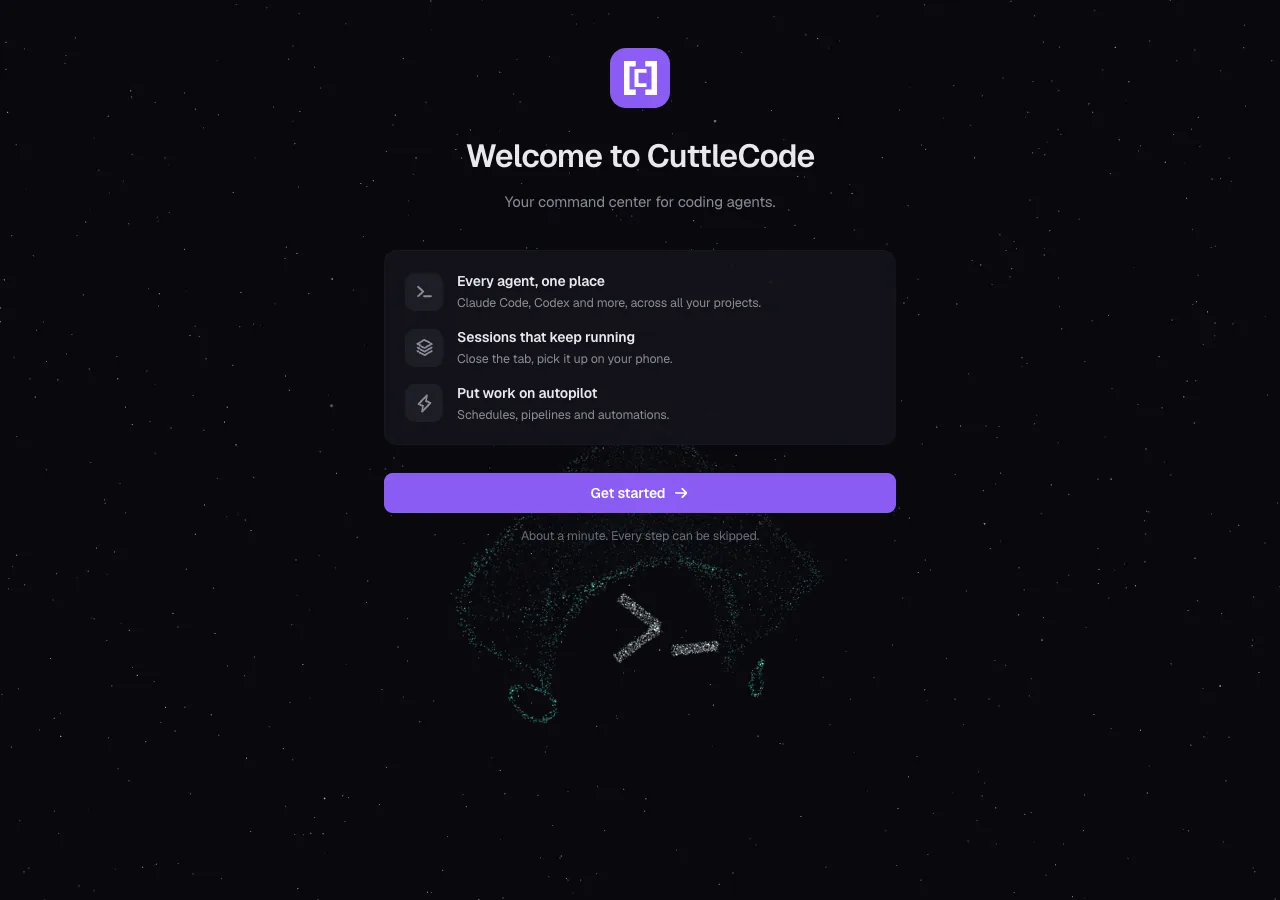
New operators land on a single first screen that combines the welcome message and the
"Continue in browser" sign-in CTA — replacing the prior two-step splash. Three value chips
(every agent in one place, sessions that keep running, work on autopilot) frame the product
before any credential is asked for. The "About a minute. Every step can be skipped." line
sets accurate expectations. The animated logo mark plays below the CTA.
10
Security
Offline Org Hard Isolation
Local-only (offline) orgs now enforce strict data isolation across every output path: no session
content relayed to Slack or Discord bridges; no run history, transcripts, or intents pushed to
cloud sync; no external analyzers, knowledge advisors, or deep-research runs; Linear write-backs
and intent thread posts suppressed; Claude-backed analyzers and summarizers blocked at the
session level. The isolation checks run at trigger time, not just at session spawn, so pipelines
and Ralph/BigRalph runs are covered too.
02 / On the bridge
See the console.
Screens pulled straight from this cycle's pull requests — captured against live, isolated instances.
System One · Focus Mode
One kind of step at a time.
Enabling System One Focus hands each ACP tool call to Laya, CLM, or Jev for a step
classification. If the call's type doesn't match the current focus — an edit during
an Inspect phase, a command during Implement — it's declined with a reason and the
session resumes from the next turn. Confidence scores appear inline in the transcript.
When Laya declines a call, the agent gets the reason and a resume prompt — then retries
correctly on the next turn. The session doesn't stall or require operator intervention;
it self-corrects within the same conversation context.
Auto-resume on decline No context loss Step focus shown in transcript
ccc.restartlabs.ai/sessions/new
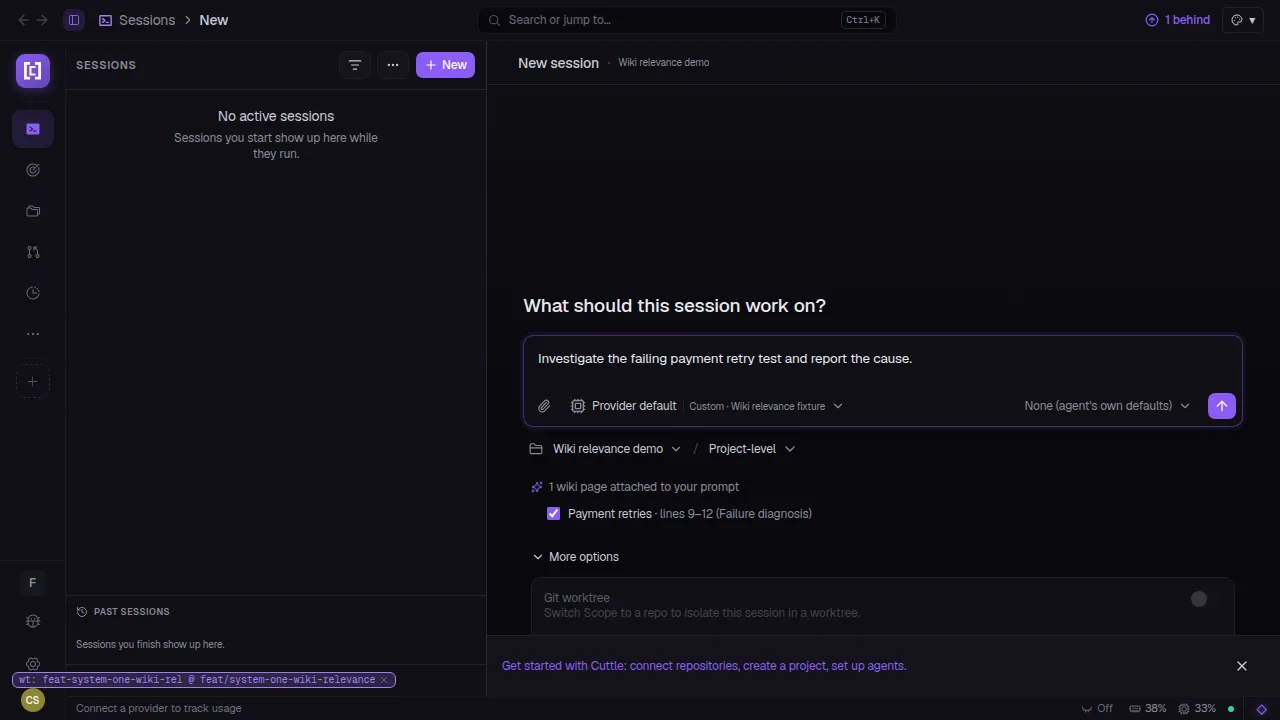
Wiki Relevance Judging — System One's LLM judge selects the most relevant wiki section and attaches it to the session prompt automatically.
ccc.restartlabs.ai/sessions/new
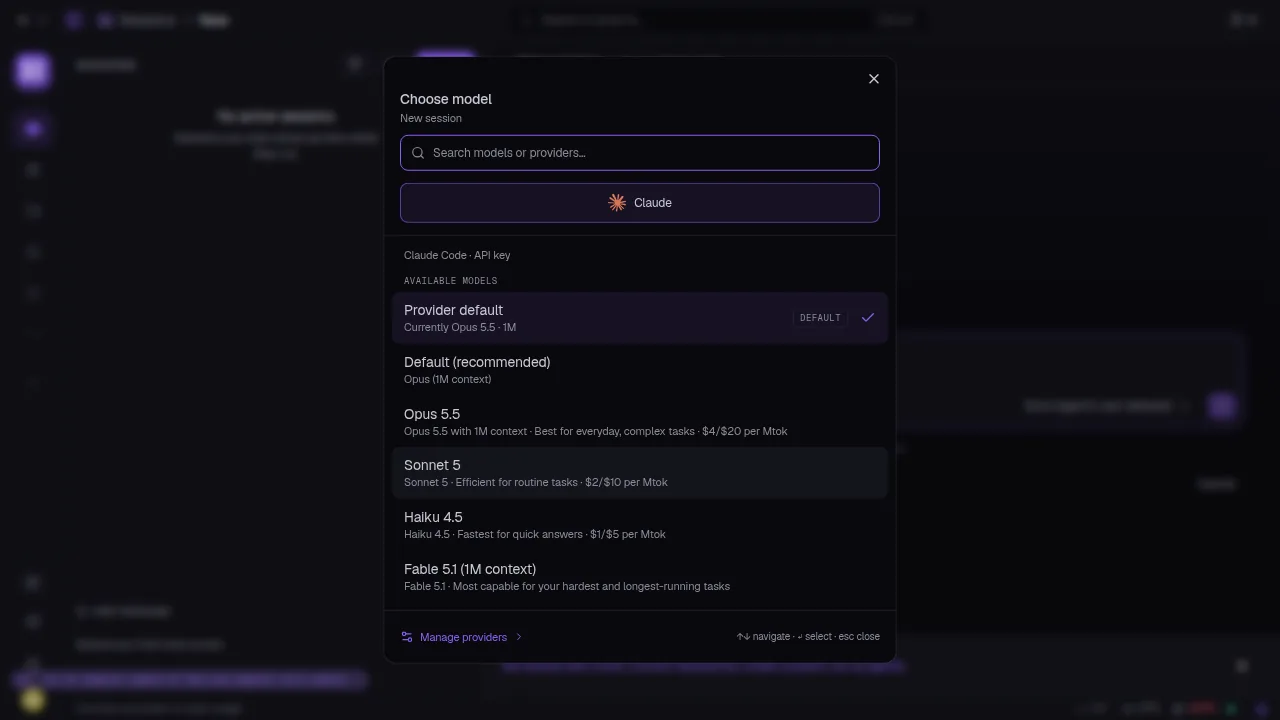
Grouped Model Picker — Claude Code and Codex entries are now grouped under a provider header with model capabilities and pricing shown inline.
ccc.restartlabs.ai/computers/qa-linux
Computers from Remote Hosts — Register any reachable host as a managed computer, view its live desktop, and attach it to an agent session.
ccc.restartlabs.ai/setup
New Welcome Screen — one first screen, one CTA, three value props. Every step skippable.
ccc.restartlabs.ai/agents
Bulk Model Change — swap the model across all project agents in one dialog.
This cycle CuttleCode gained its own distributed GPU inference fleet — nodes register, policies are enforced, models fence and deploy, sessions route through native
hardware without a cloud hop — rebuilt the knowledge base from evidence up, put an intelligent
tool-call audit layer on every ACP session, and gave Ralph the ability to prove correctness before it merges anything.
Twelve more capabilities that landed quietly this cycle.
ACP Sessions
Live Session Restore After Reboot
ACP chat sessions resume automatically after a server restart — the daemon refreshes if stale under an idle chat connection. No more losing a running conversation to a deploy.
Providers
Second Claude Account
Operators can add a second Claude account with its own isolated sign-in home. Each account resolves through its own credential store; sessions pick the right one at launch.
Security
Session Control API Scoping
Session control APIs (pause, resume, terminate) are now scoped to the source project. A session opened under project A can no longer be controlled by a request originating from project B.
Status Bar
Usage Window Selector
The persistent status bar's usage display is now configurable — choose which usage window (daily, weekly, per-session) drives the token count chip. State persists across restarts.
ACP
Adapter Auto-Update + Picker Grouping
The Claude Code ACP adapter auto-updates on server start and shows an in-app update notice when a new version is available. The model picker now groups CLI section entries under a dedicated section header.
Sessions
Automatic Spawn Routing
An experimental opt-in routes new session spawns to the least-loaded worker node automatically — no manual node pinning required. Toggle per workspace; flag is off by default.
Intents
New Intent Draft Persistence
The New Intent dialog now preserves its draft across dismissals. Closing and reopening the dialog restores the title, description, and repo field — so an interrupted intent stays recoverable.
Knowledge
System One Wiki Relevance
System One now judges each wiki section for relevance before attaching it to a session prompt. Keyword overlap only shortlists candidates; the LLM judge makes the final call — less noise, tighter context.
Inference
Context Window Enforcement
The model proxy now refuses inference requests that exceed the declared context window of the target model, returning a structured error instead of passing an oversized payload upstream.
Sessions
RAN Launch Toggle Persistence
The Remote Agent Network launch toggle now persists per workspace — operators who default to RAN sessions no longer need to re-enable it on every new session dialog.
Onboarding
Getting Started: Create Your First Agent
The Getting Started checklist gains a 'Create your first agent' step, completing the minimal path from install → project → repo → agent → session for new operators.
Git
Worktree Cleanup Protection
Worktree cleanup now preserves commit tips — a branch with unpushed commits is never deleted even when its folder is gone. Unsafe cleanup is refused with a clear reason logged.
04 / Under the hull
The unglamorous 80%.
Behind the cluster and the knowledge base, this cycle closed 125 bugs. The WAL checkpoint
is now refused if it would unsafe-disable durability. The server refuses to start on a
schema newer than it knows — preventing silent data corruption on a downgrade. Offline orgs
no longer push run history to cloud sync. Restored ACP sessions keep their pinned model
instead of falling back to the provider default. Worker nodes recheck Ollama reachability
on reconnect, so a node that was offline during setup doesn't silently present stale
capability. The auth native-Anthropic lane works under sign-in. Worktree cleanup refuses
to delete a branch with unpushed commits. Login sends users back to sign-in when the
2FA step expires instead of leaving them on a dead page. Every fix closes a class of
failure, not a single instance.
 Restart