Native sign-in for Claude Code, Codex, Gemini CLI, Cursor, Grok, and OpenCode lands in one
settings panel — credentials isolated per user, existing CLI sessions reused automatically. A new
remote ACP WebSocket runner connects sessions to a coding agent on any reachable machine.
Past sessions become a filterable history browser — search by transcript, project, or
status with side-by-side preview. Rust pipeline nodes compile and run sandboxed inside the
pipeline editor. The desktop app gets in-app update notifications with a changelog and
one-click install. And Remote Inference setup over SSH is now fully guided, with
per-user credential isolation that keeps one operator's keys out of another's sessions.
A week of foundational infrastructure: multi-provider native auth, remote ACP over WebSocket, a filterable session history, Rust pipeline nodes, in-app desktop updates, and guided remote inference setup — each shipped under test and wired end-to-end before the next one started.
01
Providers
Six AI Providers — Native Sign-In, One Dashboard
CuttleCode gains native sign-in flows for Claude Code, Codex,
Gemini CLI, Cursor, Grok, and OpenCode — all
registered as first-class providers in the new Settings → Providers panel. Existing
Claude Code and Codex CLI sessions are reused automatically, so operators who already have them signed
in don't re-authenticate. Credentials are isolated per user at the server level: one user's Codex key
is never visible to another's session. AmpCode and custom ACP executables round out the provider list
for teams running their own coding agents.
02
ACP · Remote
Remote ACP WebSocket Runners
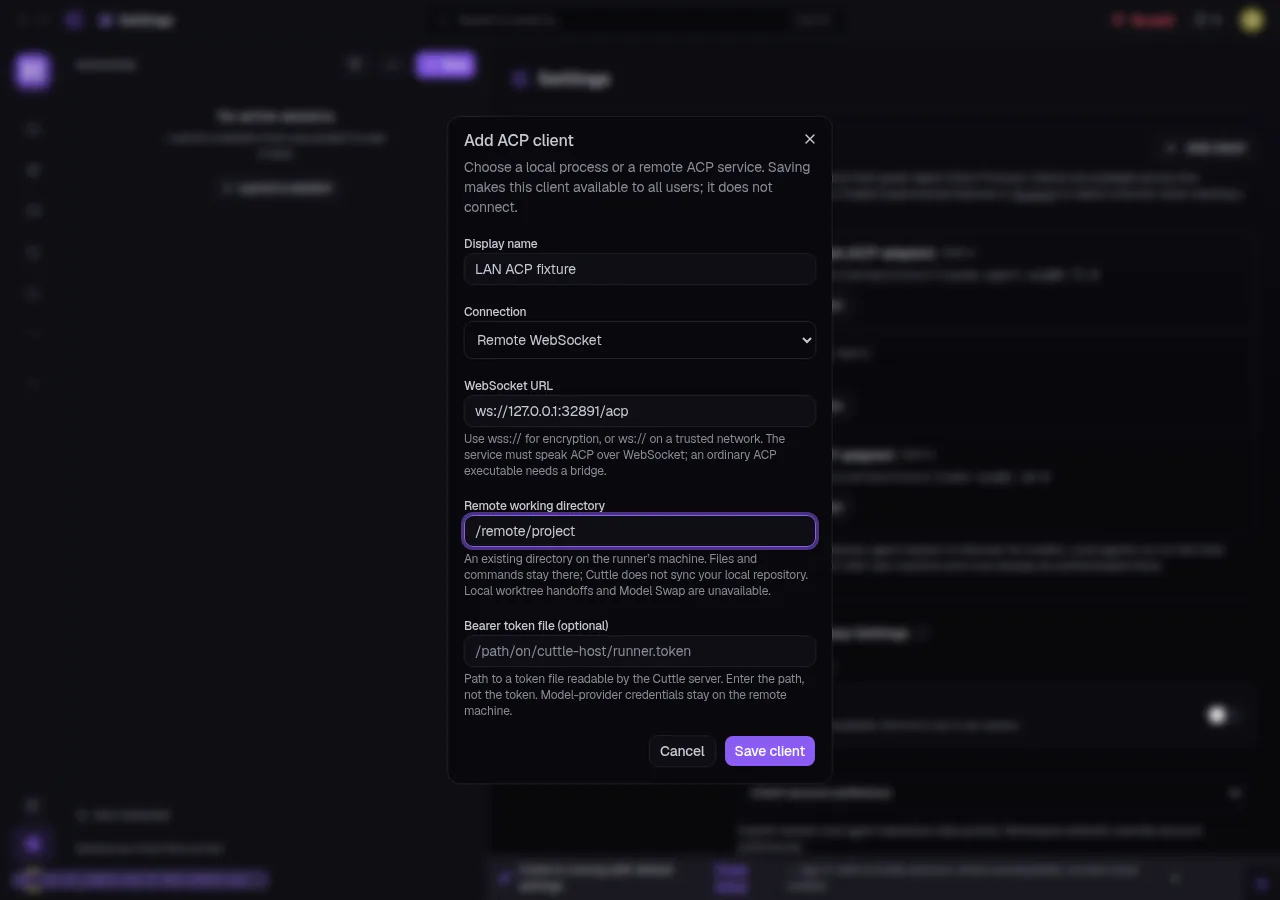
Sessions can now drive a coding agent over a remote ACP WebSocket connection — point
it at ws://<host>:<port>/acp on any reachable machine (LAN, tailnet, or
cloud) and the session runs there. Working directory stays remote; Cuttle handles the session
lifecycle, permission prompts, and chat relay locally. A companion feature routes remote Codex
sessions through Cuttle-owned workspaces, closing the gap where remote runners couldn't use
project-scoped repo contexts. Bearer-token auth is optional for trusted networks.
03
Sessions
Filterable Session History Browser
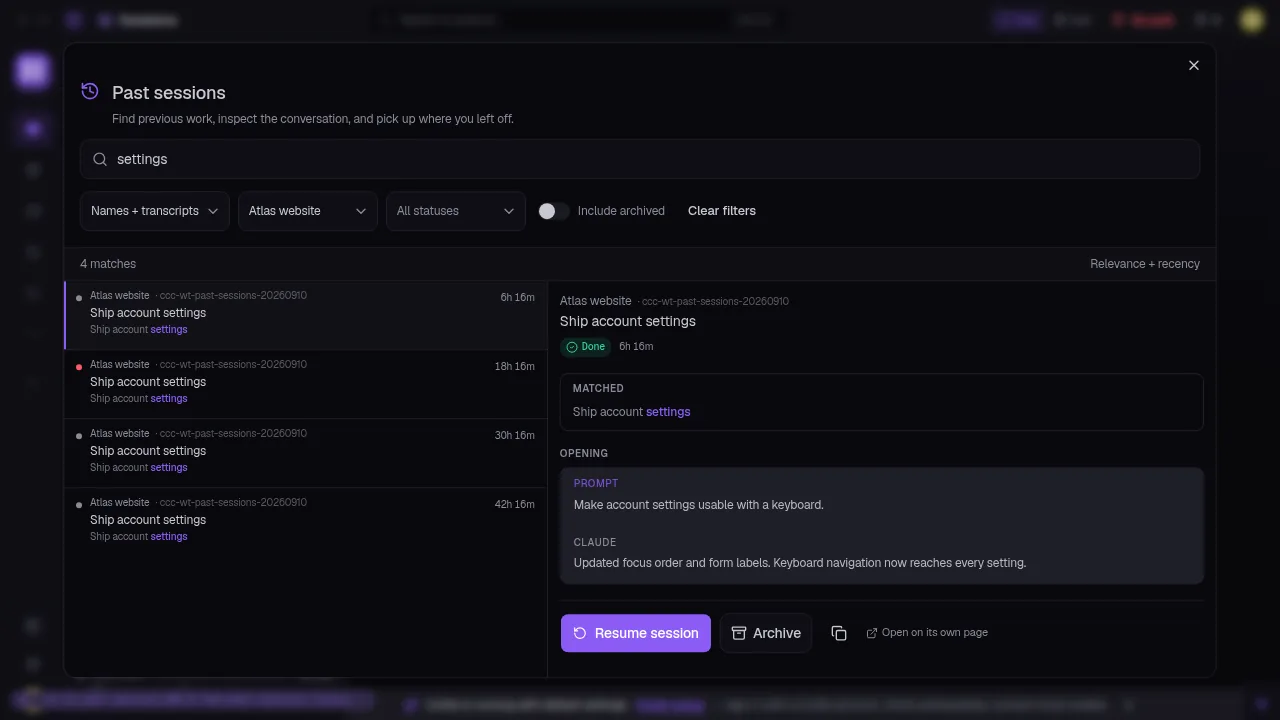
The Past Sessions panel is rebuilt as a full history browser: full-text search across
session names and transcripts, project filter, status filter (active / done / archived), and a
"include archived" toggle. Results rank by relevance + recency, with the matched
transcript excerpt highlighted inline. Selecting a row opens a side-by-side preview showing the
session's opening prompt and Claude's first reply — operators can confirm context before resuming or
archiving without opening the session itself.
04
Pipelines
Rust Pipeline Nodes — Sandboxed, AI-Assisted
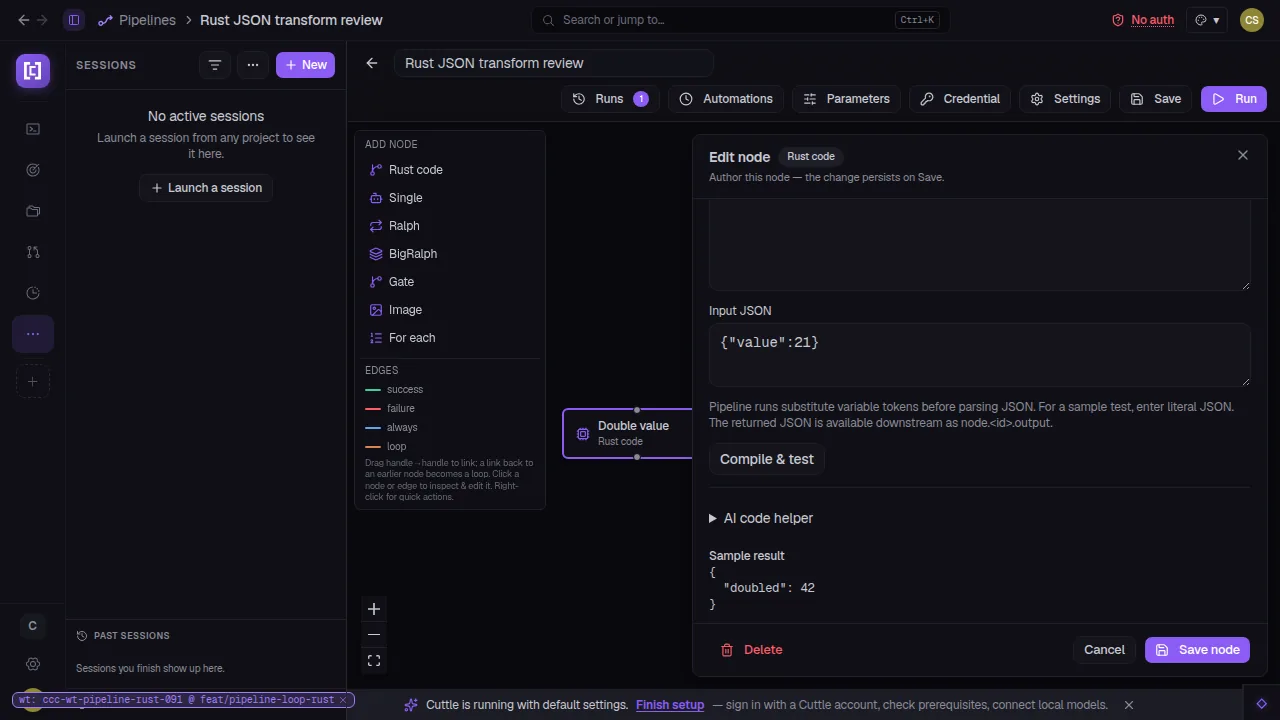
Rust is now a first-class pipeline node type. Authors write a Rust function directly in the node
editor; Compile & test sandboxes and runs it inline against sample JSON input, and
the output is routed downstream under node.<id>.output like any other node. An
AI code helper is bundled in the edit panel — describe the transform, get a working
starting point. Loop body visualization landed in the same PR: the pipeline graph now renders loop
bodies as contained subgraphs so operators can see what iterates without expanding each node manually.
05
Desktop App
In-App Update Notifications
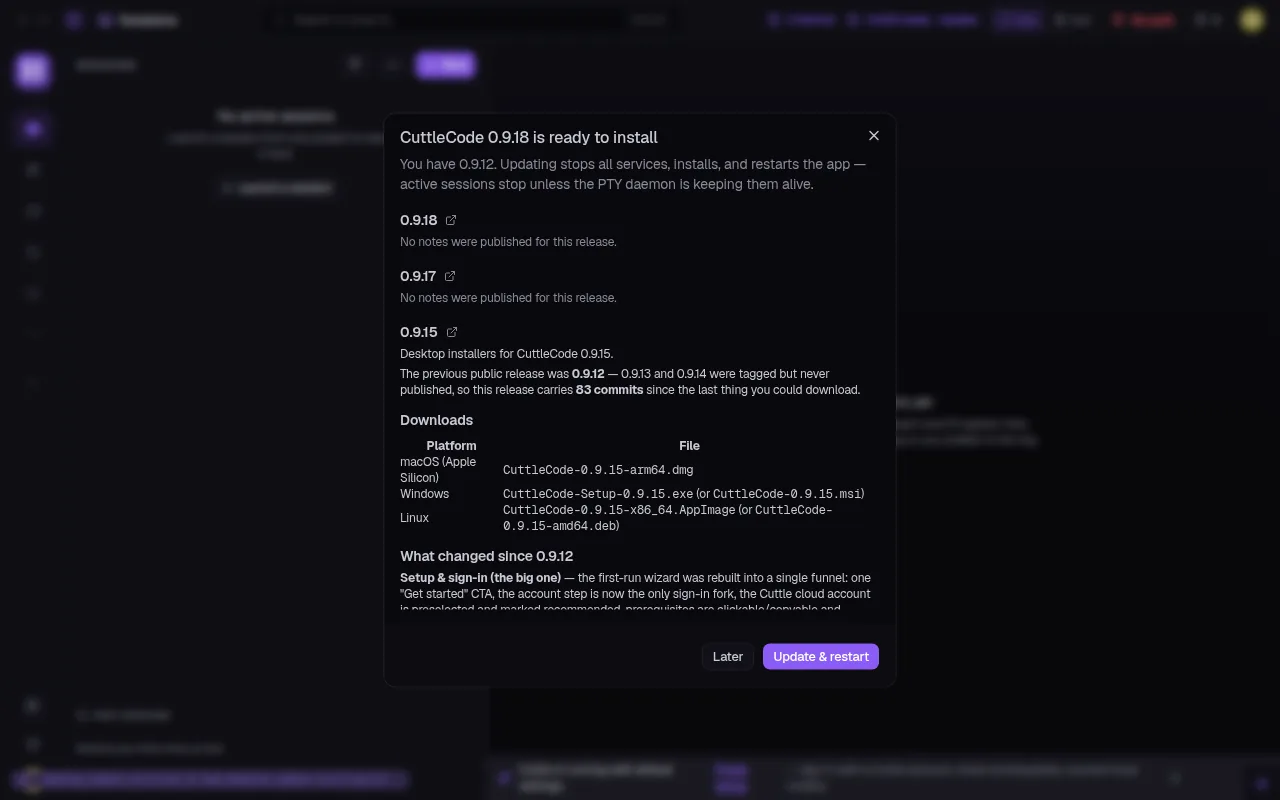
The desktop app now shows a badge in the top bar when a new release is ready: version number,
what changed (rendered from the release notes), download links for all three platforms,
and an Update & restart button. The updater never installs behind running services
— it waits for a clean stop. A companion fix ensures a staged update doesn't restart the live desktop
session before the service quorum is ready.
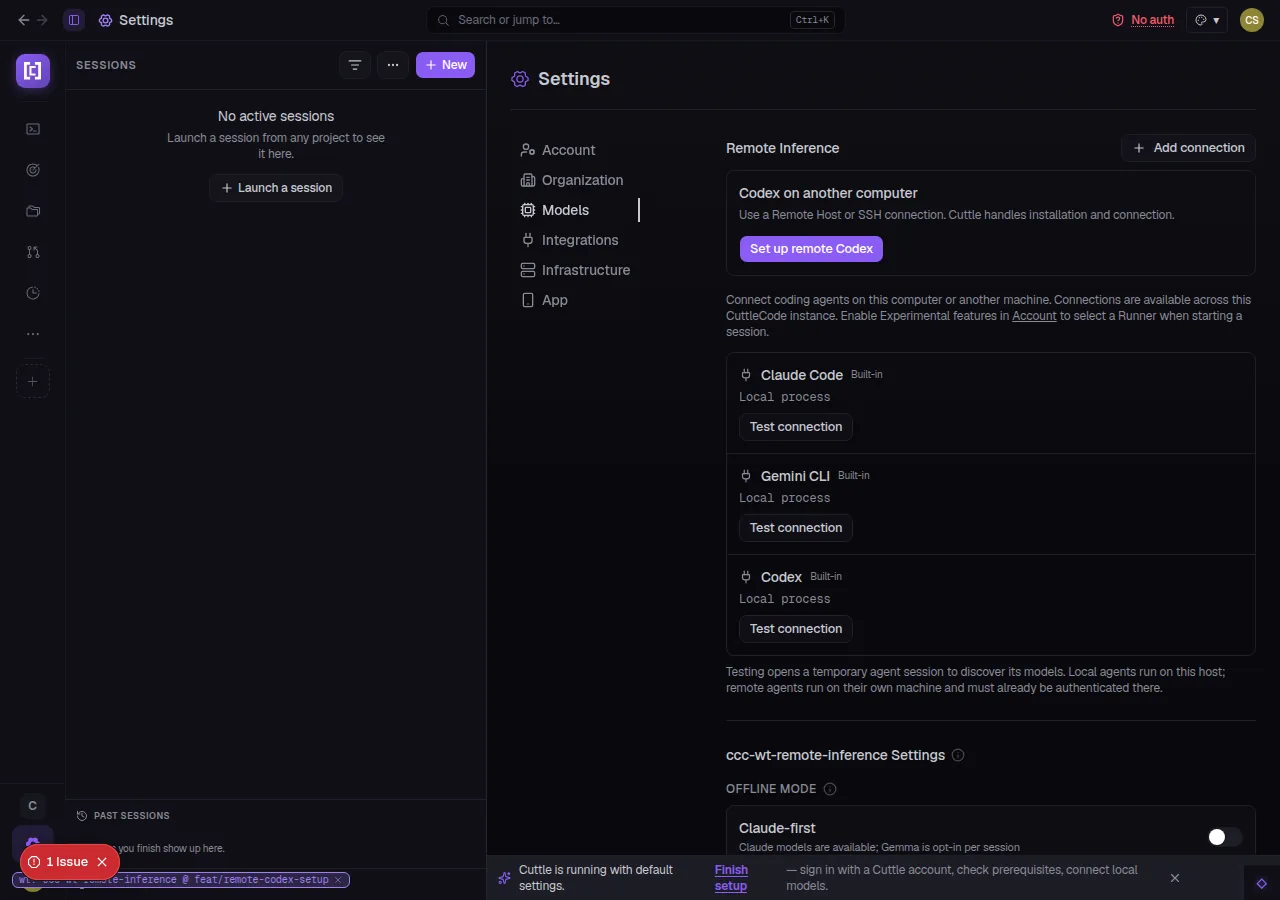
Setting up a remote coding agent on another machine is now a guided wizard: SSH into the remote host,
install the agent, verify the connection — all from inside CuttleCode's settings. Remote Inference
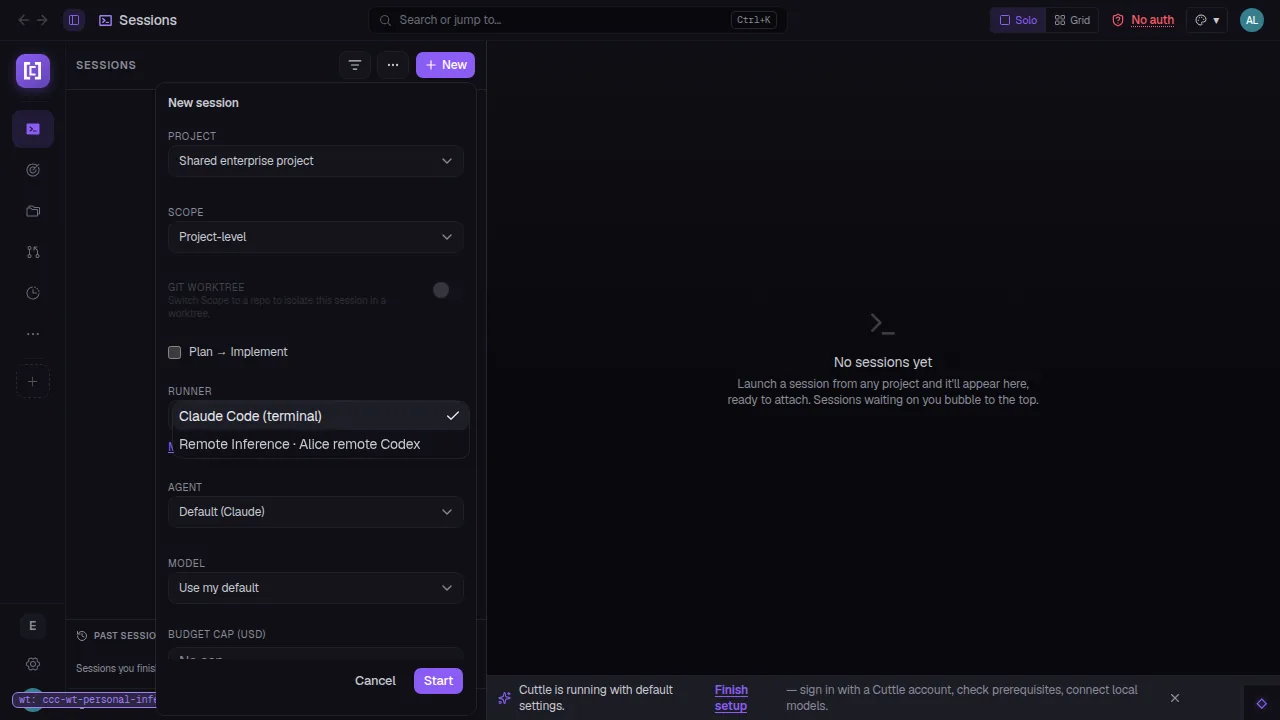
connections scope to the user who created them: Alice's remote Codex instance never
appears in Bob's session launcher. The new session launcher shows each user's own named connections
alongside the built-in local runners, with no cross-user bleed.
07
ACP · Skills
Project Skills in the ACP Slash Menu
Typing / in the ACP composer now surfaces project skills from the active
project's skill index — the same skills available to session agents, now reachable from the chat
input. Operators can reference a deploy runbook, a code-review checklist, or any custom skill without
leaving the chat surface. Skills are filtered by the project scope so only relevant ones appear.
08
Workspace
Project Inspection Workspace — Revamped
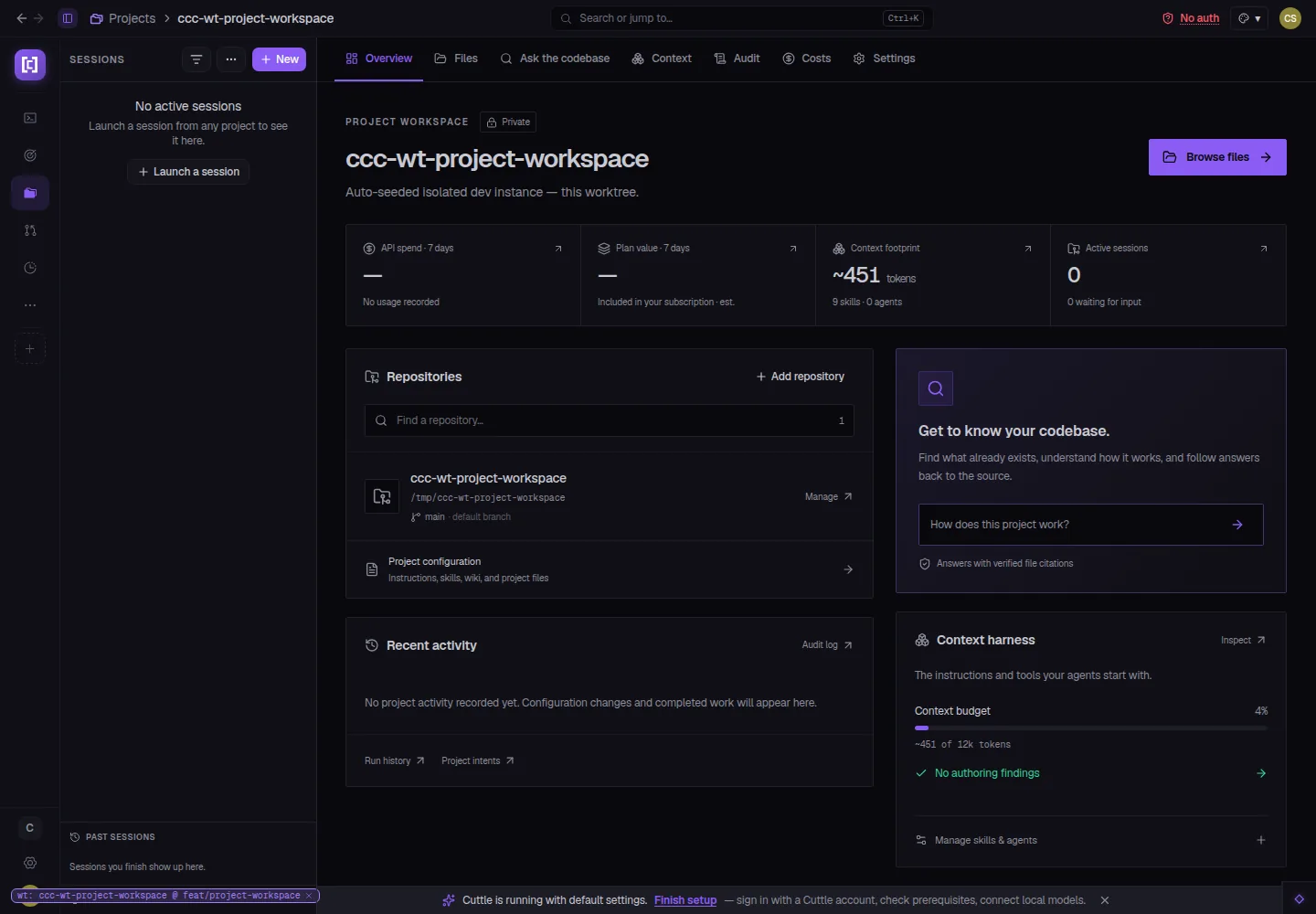
The project workspace overview is rebuilt with a tab bar — Overview, Files, Ask the codebase,
Context, Audit, Costs, Settings — replacing the old single-scrolling page. The Overview tab
shows API spend, plan value, context footprint, and active session count as live tiles. "Ask the
codebase" is now a first-class tab: type a question, get an answer with verified file citations,
without opening a session.
09
Billing
Account Subscriptions + In-App Stripe Payments
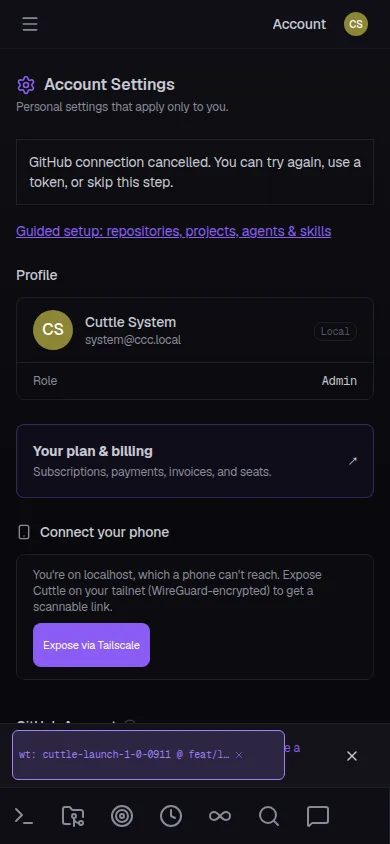
Operators can now view and manage their CuttleCode subscription directly in the app under
Account → Your plan & billing. The billing surface is Stripe Managed Payments —
invoices, seat counts, and plan tier visible without leaving the dashboard. A companion deployment
verification step validates that billing configuration is correct and live before the subscription
record is written.
02 / On the bridge
See the console.
Screens pulled straight from this cycle's pull requests — captured against live, isolated instances.
Providers · Native sign-in
Six providers in one settings panel.
The Providers page lists every configured coding agent — built-in and custom. Codex QA work shows
"Authenticated · ChatGPT Plus" with Models and Configuration tabs. Claude Code and Gemini CLI sit
below it, ready to test. Add provider opens a guided sign-in flow per runtime. Credentials never
cross user boundaries.
Claude Code Codex Gemini CLI Cursor Grok OpenCode
cuttlecode.app/settings/providers
cuttlecode.app/settings/acp-clients
Remote ACP WebSocket — configure a remote coding agent connection with a WebSocket URL, working directory, and optional bearer token.
ACP · Remote runners
Drive a coding agent on any machine.
Add a Remote WebSocket ACP client pointing at any reachable host. The working directory stays on the
remote machine; Cuttle relays chat, permission prompts, and session state locally. No file sync, no
port-forwarding gymnastics — just a WebSocket URL and an optional bearer token.
Remote WebSocket LAN · Tailnet · Cloud Bearer token auth
cuttlecode.app/sessions/history
Filterable History — search by name + transcript, filter by project and status, preview before resuming. Results rank by relevance + recency.
cuttlecode.app/settings/remote-inference
Remote Inference Settings — one panel for all local and remote coding agent connections; Test connection validates each one live.
cuttlecode.app/sessions/new
Per-User Runner Isolation — Alice's remote Codex connection appears only in Alice's launcher; other users see their own connections.
cuttlecode.app/pipelines/rust-demo
Rust Pipeline Node — write a Rust transform, test it inline against sample JSON, route the output downstream. AI code helper drafts the function body.
Project Workspace — tab-bar navigation with live usage tiles, codebase Q&A, and context harness inspection in one place.
cuttlecode.app/chat
Skills in the Slash Menu — type / in the ACP composer to surface project skills inline — deploy runbooks, review checklists, any custom skill.
cuttlecode.app/account
Billing on Mobile — plan and billing section in Account Settings, accessible from the mobile nav without a desktop browser.
This cycle CuttleCode became the platform that speaks
every AI provider's language — native sign-in, per-user credential isolation, remote WebSocket runners — while building the
infrastructure operators actually need: a searchable session history, Rust in the pipeline editor, in-app updates, guided remote inference
setup, and a project workspace rebuilt for navigation at depth.
Twelve more capabilities that landed quietly this cycle.
ACP · Scheduling
Native ACP Providers in Scheduled Runs
Automations and scheduled agents now support native ACP providers — a scheduled run can drive a remote Codex or Cursor instance the same way a live session does, with the same credential isolation.
Sessions
ACP Resume + Faster History Handoffs
Native ACP sessions resume from the last checkpoint instead of starting cold. History handoffs — reattaching to a session that left the foreground — complete in under one second on most connections.
Sessions
Session Continuity Across Server Restarts
Local ACP sessions survive a server restart. The process rebinds to the existing PTY slot rather than orphaning it, so a restart no longer drops running agents.
ACP · Providers
ACP Controls Per-Agent + Placement Config
ACP provider controls are now scoped to individual agents rather than the session. Operators choose whether the ACP picker appears in the session header, the new-session dialog, or both.
ACP · Intents
ACP Provider Settings for Agents and Intents
Agents and intents can each carry their own ACP provider preference. An intent's configured provider follows it into every launch mode — Ralph, BigRalph, Mission — with no manual picker each time.
ACP · Sessions
Session Continues via Any ACP Connection
A session's 'Continue' action now routes through the session's configured ACP connection, not just the local Claude runner. Pause on one machine, continue on another.
Workspace
Guided First-Workspace Setup
The onboarding funnel now walks new operators through workspace setup, repository linking, and GitHub auth in a single guided flow — no blank-project confusion on first launch.
Remote Hosts
Remote Host Key Setup Without sshpass
The remote host key provisioning step no longer requires sshpass. Key exchange happens through an interactive prompt in the setup wizard, compatible with key-based-only SSH configs.
Branding
CCC → CuttleCode Sweep
All remaining user-visible references to 'CCC' in CLI output, onboarding text, and session logs have been updated to CuttleCode. Internal code identifiers are unchanged.
Ralph · BigRalph
Watchdog + Race Fixes
The idle watchdog now respects live foreground work — restarts from session handoffs no longer count as idleness. BigRalph's per-run judge timeout is enforced; a dirty inline slice after restart no longer stalls the lane.
Desktop App
Safe Update Install Guard
The desktop updater never installs a staged update while services are running. MSI installs also gained a parallel fix: the installer waits for a clean service-stop before proceeding.
Mobile
Mobile Launcher + Account Settings Polish
The mobile new-session launcher no longer clips its bottom row on smaller phones. Account and organization settings on mobile received a layout pass: inputs are correctly sized, labels are accessible.
04 / Under the hull
The unglamorous 80%.
Behind the 26 feature PRs, this cycle closed 31 bugs. Duplicate Claude terminal questions and
dropped-answer recovery are fixed at the source. ACP sessions stuck after daemon loss now recover
instead of blocking. The stale model label in the ACP chat footer is gone. Session artifact links
and local file opening work correctly for all path types. GitHub credential forwarding to local ACP
sessions is repaired. The server PATH is widened to reach per-user tool directories that a
service-mode launch misses. The native updater no longer restarts the desktop session mid-service.
The mobile project launcher no longer clips its ACP options. Ralph's idle watchdog respects live
foreground work; BigRalph's per-run judge timeout is enforced. Every fix closes a class of failure,
not a single instance.
 Restart