ACP. Parallel lanes. Fan-out.Agents working harder, built by hand.
Agent Client Protocol support lands — any ACP-capable agent runs as a
first-class CuttleCode session, with agent and model selected at launch. BigRalph
gains parallel lanes and a configurable wave knob: stories that collide get isolated git worktrees,
the rest share, and a mid-run checkpoint judge evaluates each wave before the next starts.
Ralph fans out across all disjoint ready stories simultaneously — independent
stories stop waiting on each other. The browser extension graduates to Slice 6: it drives the
tabs you share, not just watches them. And sessions can now be forked into a new
session carrying the full context of the original.
Ten systems that raise what autonomous work can reach.
ACP turns every Claude.ai agent into a first-class Cuttle session. BigRalph grows parallel lanes and wave-checkpointing. Ralph fans out across disjoint stories simultaneously. The browser extension graduates. Sessions fork. Fable 5.1 becomes the planner default. Each piece shipped under test, wired before the next one started.
01
Agent Client Protocol
ACP — Any Agent, First-Class in CuttleCode
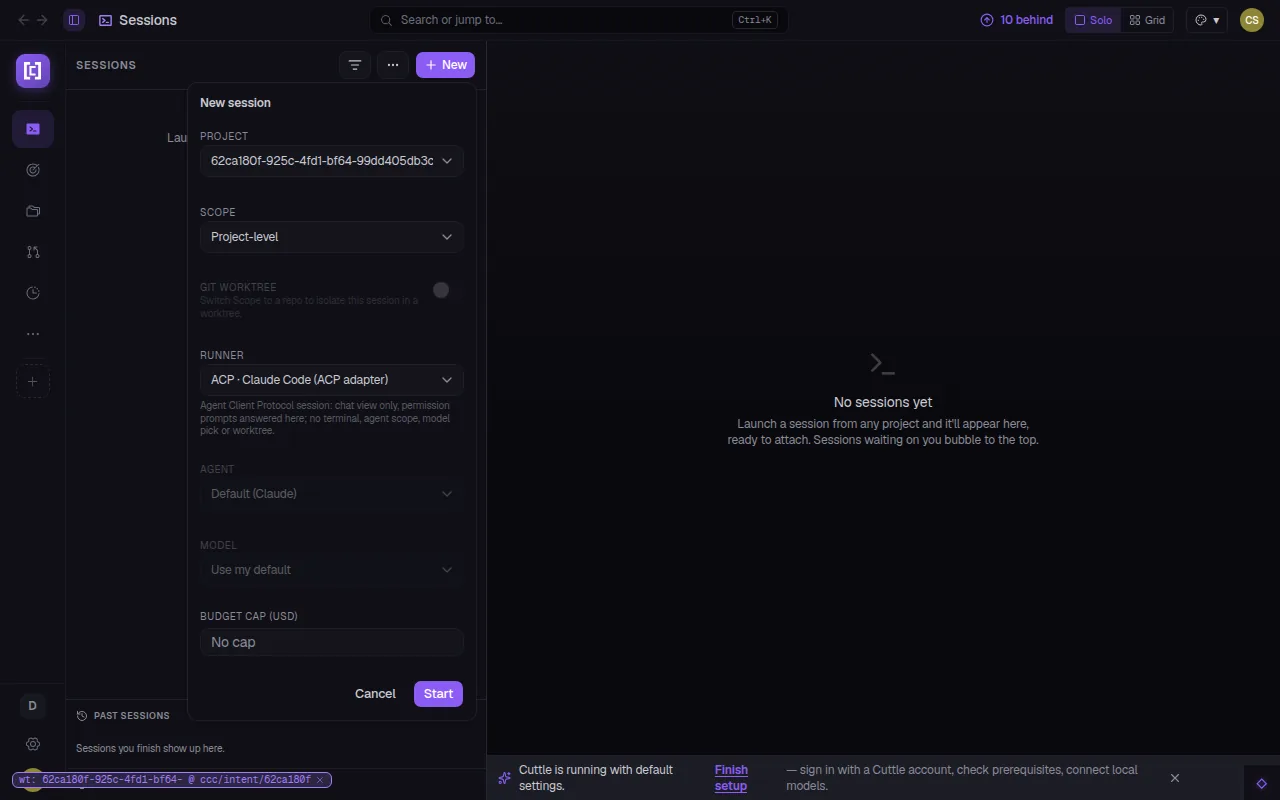
CuttleCode now speaks the Agent Client Protocol as a client. Select the
ACP · Claude Code adapter runner in the new-session popover and an ACP session
opens in the sessions pane like any other — chat view only, permission prompts answered in the
UI, no terminal. The agent and model are configurable at launch from dedicated dropdowns that
activate when ACP is selected. Mobile gets its own ACP runner picker in the launch sheet the
same week.
02
BigRalph
Parallel Lanes + Waves + Checkpoint Judge
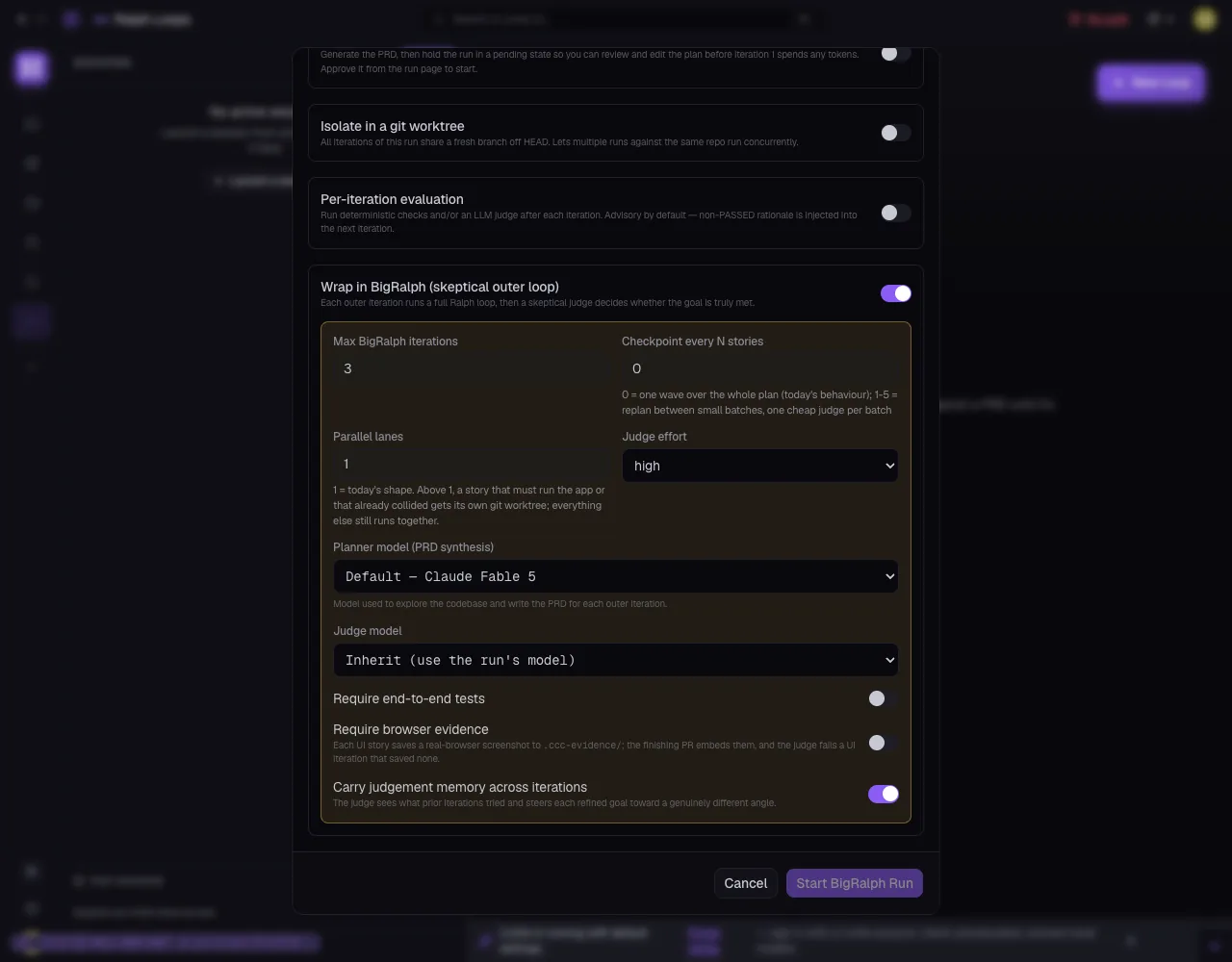
Three levers that change the shape of a BigRalph run. Parallel lanes (set
the integer in the launch dialog) give each collision-prone story its own git worktree;
everything else shares. Waves set the batch size — 0 means one wave over the
whole plan (previous behaviour); 1–5 replans between small batches. A
checkpoint judge evaluates each wave, injects its verdict into the next
iteration, and gates forward progress on evidence, not just the iteration count. Judge effort,
planner model, and memory across iterations are all individually configurable.
03
Ralph
Parallel Subagent Fan-Out
Ralph now dispatches all disjoint ready stories in a single wave rather than
one at a time. Stories with no shared dependencies execute concurrently; only blockers create
sequential waiting. A story that must run the app or that collides with a sibling still gets
isolated — everything else moves in parallel.
04
BigRalph
Task Graph — Default View
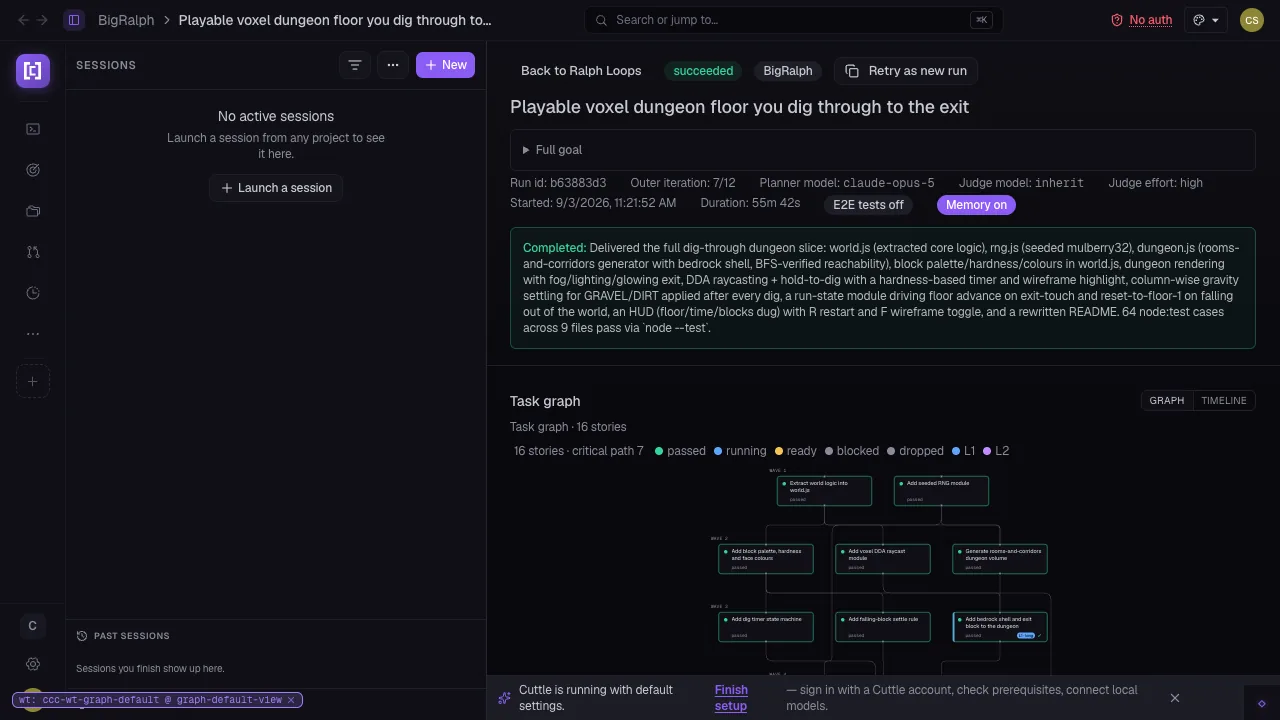
Open any BigRalph run and the task graph is already the active tab — story
nodes, wave bands, dependency edges, and the critical path visible without an extra click. The
GRAPH / TIMELINE toggle remains for operators who want the raw timeline; graph is simply the
first thing you see.
05
Browser Extension
Slice 6 — Extension Drives the Tabs It Shares
The browser extension graduates to Slice 6. Shared tabs are now driven by the
extension, not just observed — the extension controls navigation, scroll, and focus inside the
paired view. Status is truthful: the badge no longer claims paired when the connection has
dropped. The paired view persists across tab navigations and a Share opens a fully wired
connection in one click.
06
Sessions
Fork a Session
Any session can now be forked into a new session that inherits the full
context of the original — conversation history, working directory, ambient ccc auth. Useful for
branching exploration from a known good point without losing the original session's state. The
forked session opens as a peer in the sessions pane, linked back to its source.
07
Sessions
Running Ralph Loops in the Sessions Pane
Active Ralph and BigRalph runs now surface directly in the
sessions pane alongside regular sessions — run name, elapsed time, and current phase visible
in the list without leaving the page. Previously operators had to navigate to the dedicated
loop pages to see what was running.
08
Chat
Background Subagents Docked Below the Log
Running background subagents now surface as docked chips at the bottom of
the chat log — agent name and elapsed time visible inline. No terminal switch required to
track what a background agent is doing or when it finishes.
09
Onboarding
Guided Setup Funnel
A fresh install now reaches a single guided funnel with a clear way back out
of every step. Previous versions had disconnected onboarding flows with no unified back path.
Each step probes the prerequisite it covers; the funnel only advances when the check passes.
10
Models
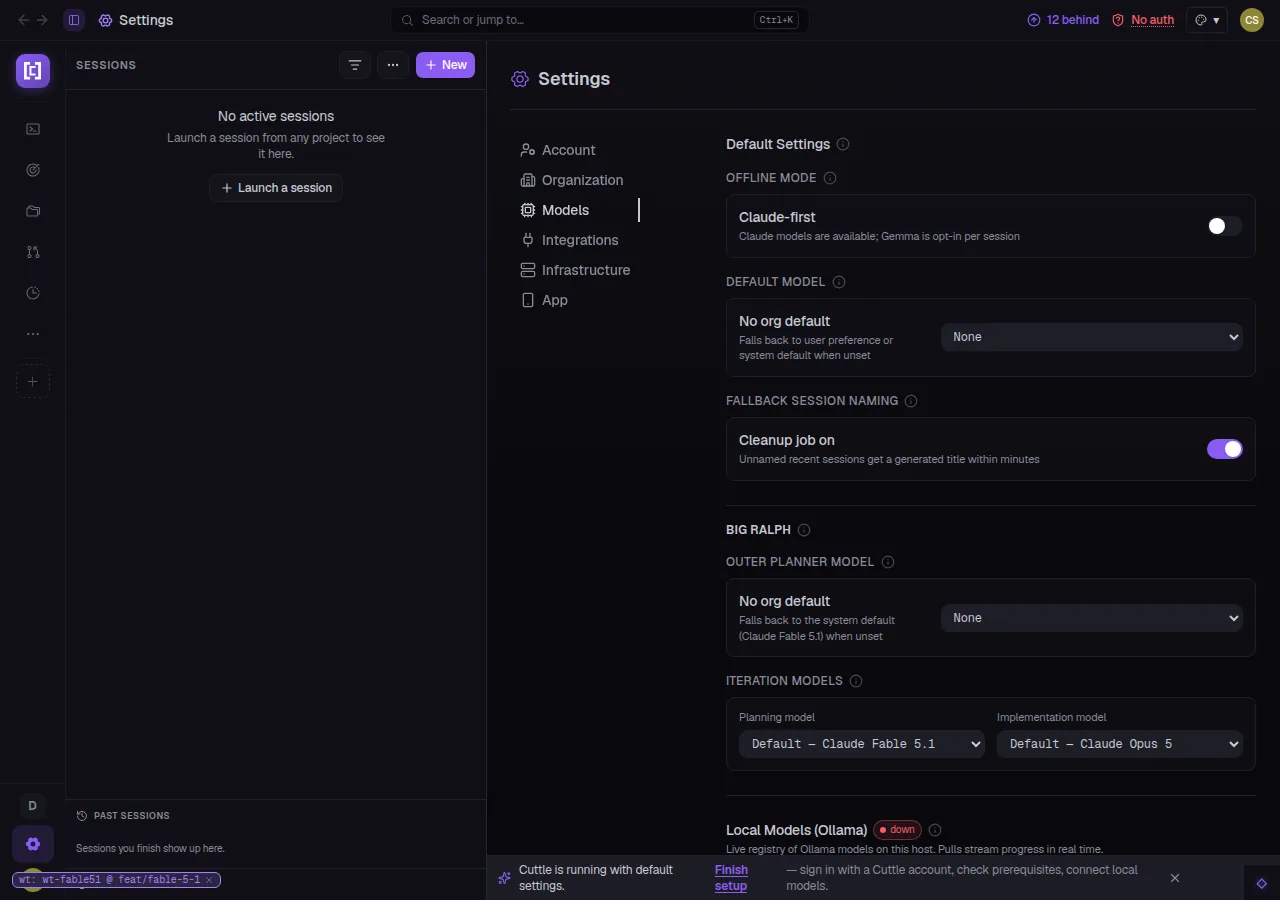
Claude Fable 5.1 — New Planner Default
Claude Fable 5.1 lands in the model picker and is immediately promoted to the
default BigRalph outer-planner model. The iteration implementation model defaults to Opus 5,
unchanged. Both are individually configurable per run from the launch dialog.
02 / On the bridge
See the console.
Screens pulled straight from this cycle's pull requests — captured against live, isolated instances.
Agent Client Protocol · Sessions
Any ACP agent, in the panel.
Select ACP · Claude Code (ACP adapter) from the runner dropdown and an ACP
session opens in the sessions pane like any native session — chat view, permission prompts
handled, agent and model configurable at launch. No terminal. No separate client.
ACP runner Agent picker Model picker Mobile launch sheet
cuttle.run/sessions/new
cuttle.run/ralph/bigralph/start
BigRalph · Parallel Lanes & Waves
Lanes, waves, and a judge between every batch.
Parallel lanes give collision-prone stories their own worktree — everything else shares.
The wave knob sets the batch size between checkpoint judges. The judge effort, planner model,
and memory-across-iterations are each independently configurable from the launch dialog.
Task graph — default view. Story nodes, wave bands, dependency edges, and critical path visible the
moment you open a run. The GRAPH / TIMELINE toggle remains for the raw timeline.
cuttle.run/settings/models
Fable 5.1 as planner. The outer-iteration planner defaults to Fable 5.1; implementation
stays on Opus 5. Both are overridable per run from the launch dialog.
cuttle.run/sessions/bgagents
Subagents docked below the log. Running background agents surface as chips at the bottom of
the chat — name and elapsed time visible inline, no terminal required.
This cycle CuttleCode opened its sessions pane to any ACP agent, gave BigRalph the tools to run stories in parallel waves with a judge watching every batch,
taught Ralph to fan out across independent stories simultaneously, let the browser extension drive the tabs it shares, and made sessions forkable — all in seven days, all under test.
Twelve more capabilities that landed quietly this cycle.
Intents
Plan Steps Tick Live
Autoplay now checks off intent plan steps in real time as Ralph iterations complete them. Operators watching a run see the checklist update step by step instead of waiting until the session finishes.
Intents
spawn_session Autoplay Verb
A new autoplay verb lets autoplay start a real work session as its next action, replacing the previous workaround of manually launching from the Chat rail. The autoplay judge can see the current PR and factor it into its next proposal.
Mobile
ACP Runner Picker in Launch Sheet
The mobile session launch sheet now exposes the ACP runner alongside the standard runners. Account preference parity also ships — org-level model defaults, BigRalph settings, and offline-mode toggle are all reachable from the phone.
Chat
Pasted Images in the Transcript
Images pasted into the composer now appear inline in the chat transcript, exactly where the paste landed in the conversation. Previously pasted images were accepted but invisible in the rendered history.
Chat
Image Viewer — Swipe Navigation
The chat image viewer now supports swipe gestures (mobile) and arrow keys (desktop) to step through all images in a conversation. Previously each image had to be opened and dismissed individually.
Sessions
Wrap Session Names
A new view option wraps long session names in the sessions panel instead of truncating them. Useful on wider monitors where the panel has room but names were still cut off at fixed widths.
Ralph / BigRalph
Running Loops in the Sessions Pane
Active Ralph and BigRalph runs now appear directly in the sessions pane alongside regular sessions. The run name, elapsed time, and current status are visible without navigating to the dedicated loop pages.
Intents
Priority Label Restored
The intent priority label — P0 through P3 — is back on the list and detail views after a regression in the Intents v2 overhaul removed it. Priority is set at creation or edited inline.
Pipelines
Travelling-Arc Animation on Running Node
The active node in a pipeline graph now shows a travelling-arc animation — the same glow-pulse that runs on BigRalph wave nodes — so the current execution position is unambiguous at a glance.
Infrastructure
PTY Daemon Lane On by Default
New native installs now start with the PTY daemon lane enabled. Sessions survive server restarts by default without any opt-in step.
Workspaces
No Default Workspace on Fresh Installs
Fresh installs no longer create a Default workspace. The home screen links directly to the first project instead, removing a confusing empty-state hop that new operators had to click through.
Intents
PRD Is a Living Document
The PRD attached to a BigRalph run is now updated in place as the outer loop refines the goal across iterations. Each iteration's planner edits the same document rather than creating a separate draft.
04 / Under the hull
The unglamorous 80%.
Behind the headline launches, this cycle closed 78 bugs. The BigRalph UI received
fifteen targeted fixes: dead runs that labelled themselves "Planning", blocked stories
that showed no detail, iteration cards that went silent mid-run, the Edit-graph sheet
that queued duplicate edits, the run header that named a model the run never used, the
minimap that swallowed corner controls — every surface now tells the truth. The mobile
back arrow, mobile account settings, and the Mac desktop launch crash (CFBundleName vs
helper name mismatch) each received an isolated root-cause fix. ACP sessions now receive
the full CuttleCode context and skills index. Idle watchdogs respect live foreground
work and no longer count restarts as inactivity. Every fix removes a class of failure,
not a single instance of it.
 Restart