The rename. The cloud. Sessions redesigned.Intents rebuilt from scratch.
CCC ships its biggest identity change yet: the product is now CuttleCode, the
CLI renames to cuttle, and every surface follows. CuttleCode Cloud
launches with GitHub, Google, and Discord OAuth, org-level encrypted secrets, and a link-from-Settings
flow that needs no terminal. Intents v2 ships across ten phases — a redesigned
two-column detail page, an inbox-style list, per-intent base branches, run-scoped PRDs, autoplay
legibility, and full mobile parity. A seven-phase PTY daemon keeps sessions alive
through server restarts. And the sessions pane docks on every page, grouped by project, with a
decluttered icon rail that replaces a 17-item sidebar.
A product rename, a cloud identity layer, a complete Intents redesign, a daemon that outlives the server, a permanent sessions panel, a first-run wizard, an always-on-top chat window, a fifteen-patch perf sprint, and signed macOS installers — each one shipped under test, wired in before the next one started.
01
Platform
CuttleCode — The Rename
CCC is now CuttleCode. The CLI renames from ccc to cuttle
— with ccc kept as a working alias so existing scripts don't break. Every user-facing
surface follows: the desktop app, tray icon, splash screen, web UI chrome, tab titles, and nav
wordmark. The deeper renames — env vars, data dirs, internal package names — are deliberately
deferred so operators don't need to touch infrastructure. The mark, the violet palette, and the
product voice are unchanged.
02
Intents
Intents v2 — Rebuilt Across Ten Phases
A ground-up redesign shipped in ten sequential phases over three weeks. The detail page becomes a
two-column layout: Plan · Changes · History on the left, a standing chat rail on
the right — no tab-switching to talk to the assistant working on the story. The list page reads as
an inbox: open items first, a stage that ends says so, unattended runs tell the
truth. Run-scoped PRDs, per-intent base branches, autoplay legibility, and full
mobile parity shipped across phases 0 through 10. The chat rail gets hands — it can write to the
plan, check off steps, and start the next phase without leaving the page.
03
Cloud
CuttleCode Cloud — Accounts, OAuth & Org Sync
CuttleCode Cloud launches on Supabase. Accounts sign in via GitHub, Google, or Discord
OAuth. Secrets are stored encrypted at rest with org-level DEK custody —
the org's data-encryption key never leaves the instance. Config files (CLAUDE.md, agents, skills)
sync automatically between machines in an org; secrets never do. An operator can
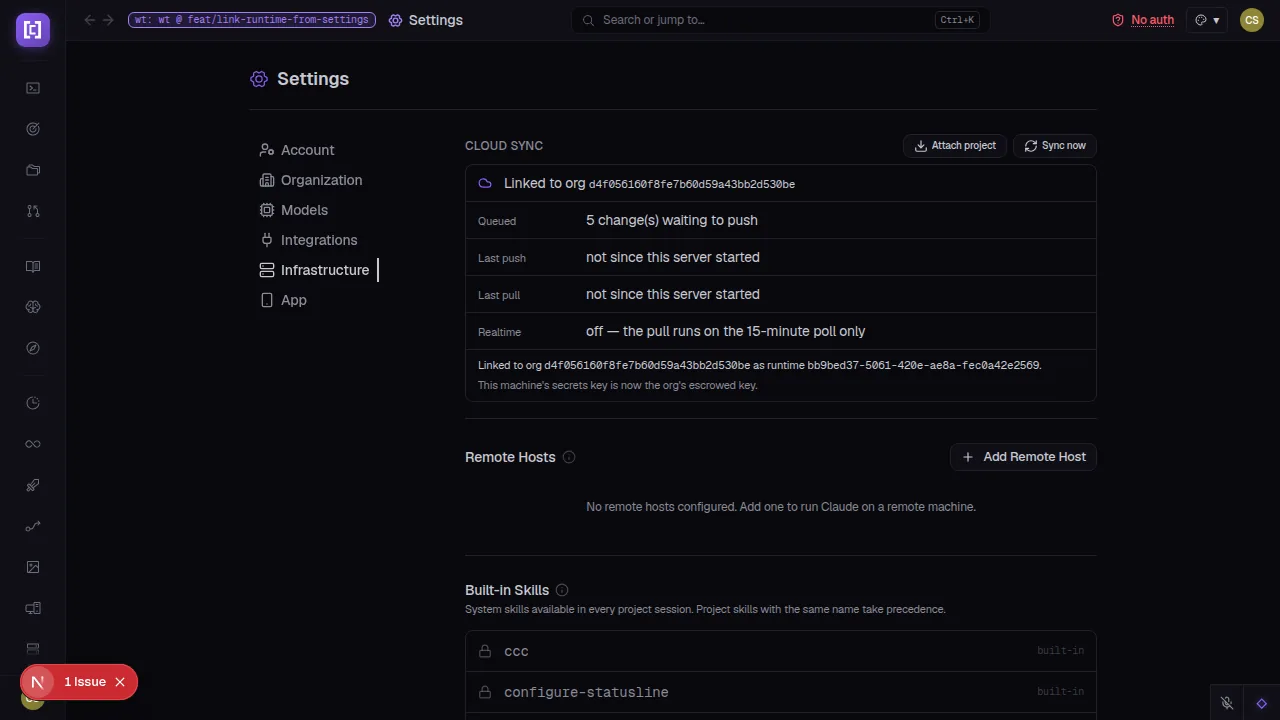
link a runtime and migrate into it from Settings, with no terminal — the same
three API calls the CLI uses, driven through the browser's own user session. A
/dashboard shows the org's plan, linked devices, members, projects, and invites.
04
Infrastructure
PTY Daemon — Sessions Outlive the Server
Seven progressive phases shipped the PTY daemon: the server hands open sessions to a sidecar
process at startup so sessions survive a server restart — no reconnect, no lost
terminal state. Phase 3 adds re-adoption on reconnect. Phase 4 carries Ralph iterations through
in-app updates. Phase 5 extends to the Docker lane. Phase 6 adds a status surface and an honest
updatePending flag. The daemon runs in its own uncapped cgroup slice so a worktree
OOM can never kill live sessions. Opt-in by default; planned as the GA path.
05
Sessions
Global Sessions Pane — Grouped by Project
The sessions pane docks on every page, not just /sessions. Sessions
group under collapsible project headers — a header carries an unread dot when anything inside is
unread, even collapsed. Projects drag to reorder; the arrangement persists. The nav shrinks to a
66px icon rail with a ⋯ More flyout for rarely-used destinations, eliminating the
17-item sidebar that required a scroll hint.
06
Onboarding
First-Run Setup Wizard
A fresh install lands in a guided setup wizard instead of an empty Sessions view. Five steps:
environment type, account (Cloud-first, local as legacy), live prerequisite probes, integrations,
and advanced settings. An instance config editor lives in Settings → Admin for post-install
changes. A Safe Restart button names exactly what it would interrupt before
proceeding.
07
Chat
Chat Pop-out — Picture in Picture
A single button moves the session's chat into a floating always-on-top window via
the Document Picture-in-Picture API — a real Chromium window that stays visible across apps and
macOS Spaces. No Electron changes, no new dependency. Click again to bring the chat back into the
pane. A placeholder keeps the pane readable while the window is open. Works in the desktop app
too.
08
Performance
Fifteen-Patch Performance Sprint
Fifteen targeted perf patches landed in a single day. WAL checkpoints move to a worker thread.
The session-search indexer runs off the event loop. DB indices eliminate a 250ms → 12ms pipeline
poll. The session-namer sweep becomes incremental. Auto-push circuit-breaks before staging
oversize files. The config-sync scanner yields cooperatively and excludes build trees.
Transcript export streams instead of buffering. Each patch targeted a measured hotspot —
[loop-block] shim timings pinpointed every bottleneck before the fix.
09
Desktop
macOS Signing + Linux AppImage Installer
The macOS desktop app now ships with Developer ID code signing and notarization
— the .app, the Squirrel.Mac .zip, and the .dmg container
all carry a valid Apple ticket. The darwin auto-update lane is unblocked. On Linux, the AppImage
gains a launcher entry and a guided install flow — operators can register it with the system and
pin it to their dock without a terminal.
02 / On the bridge
See the console.
Screens pulled straight from this cycle's pull requests — captured against live, isolated instances.
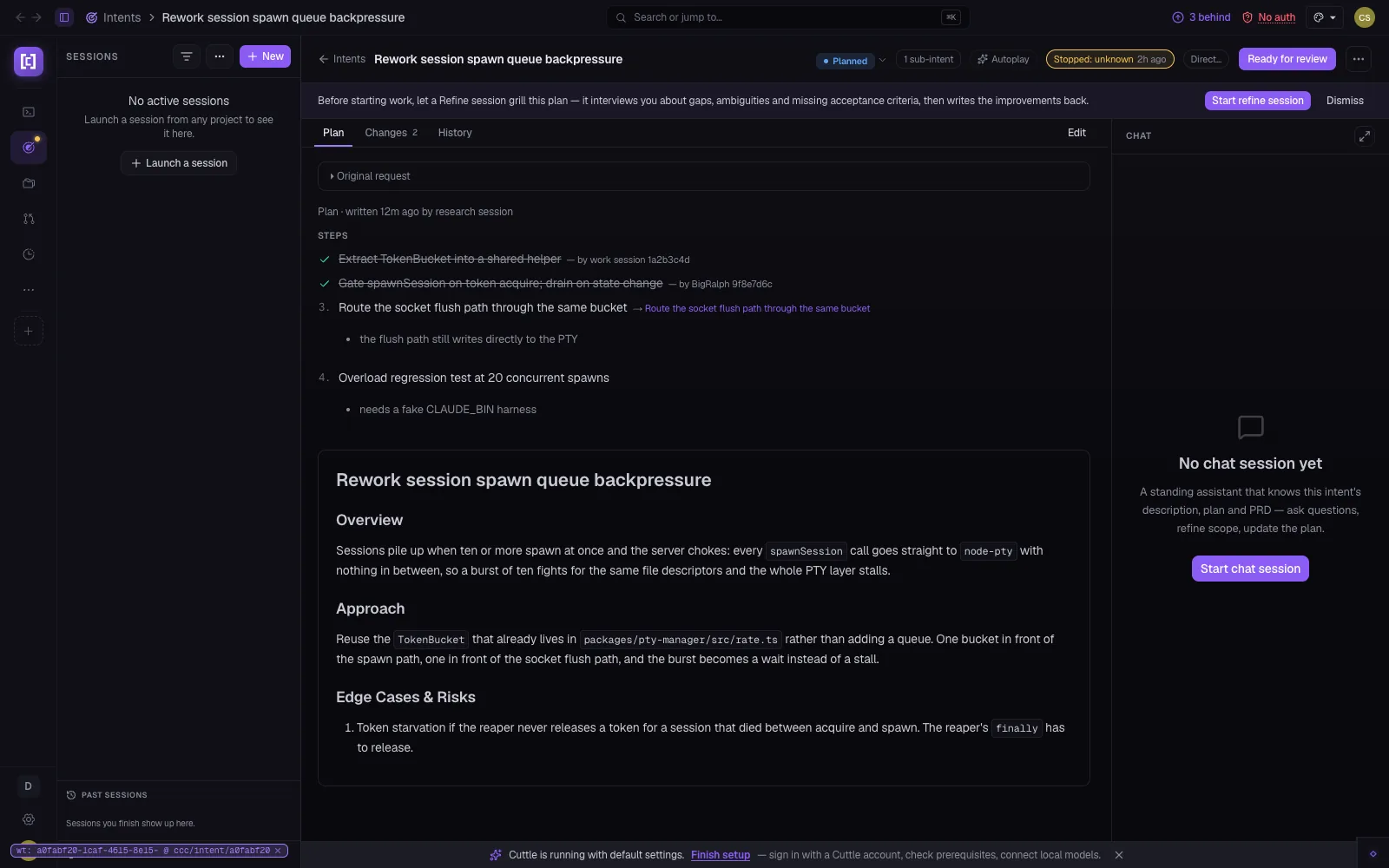
Intents v2 · Detail Page
Two columns. One story.
The redesigned intent detail page puts the document — Plan, Changes, History — on the left and
the standing chat rail on the right. The assistant that knows the story is always one line away.
Steps that are done show attribution; the Original request collapses so it stays in reach without
taking up space. A "Ready for review" chip on the header says where the intent stands without
opening any tab.
Plan · Changes · History Standing chat rail Autoplay · ten phases
cuttle.run/intents/a0fabf20
cuttle.run/sessions
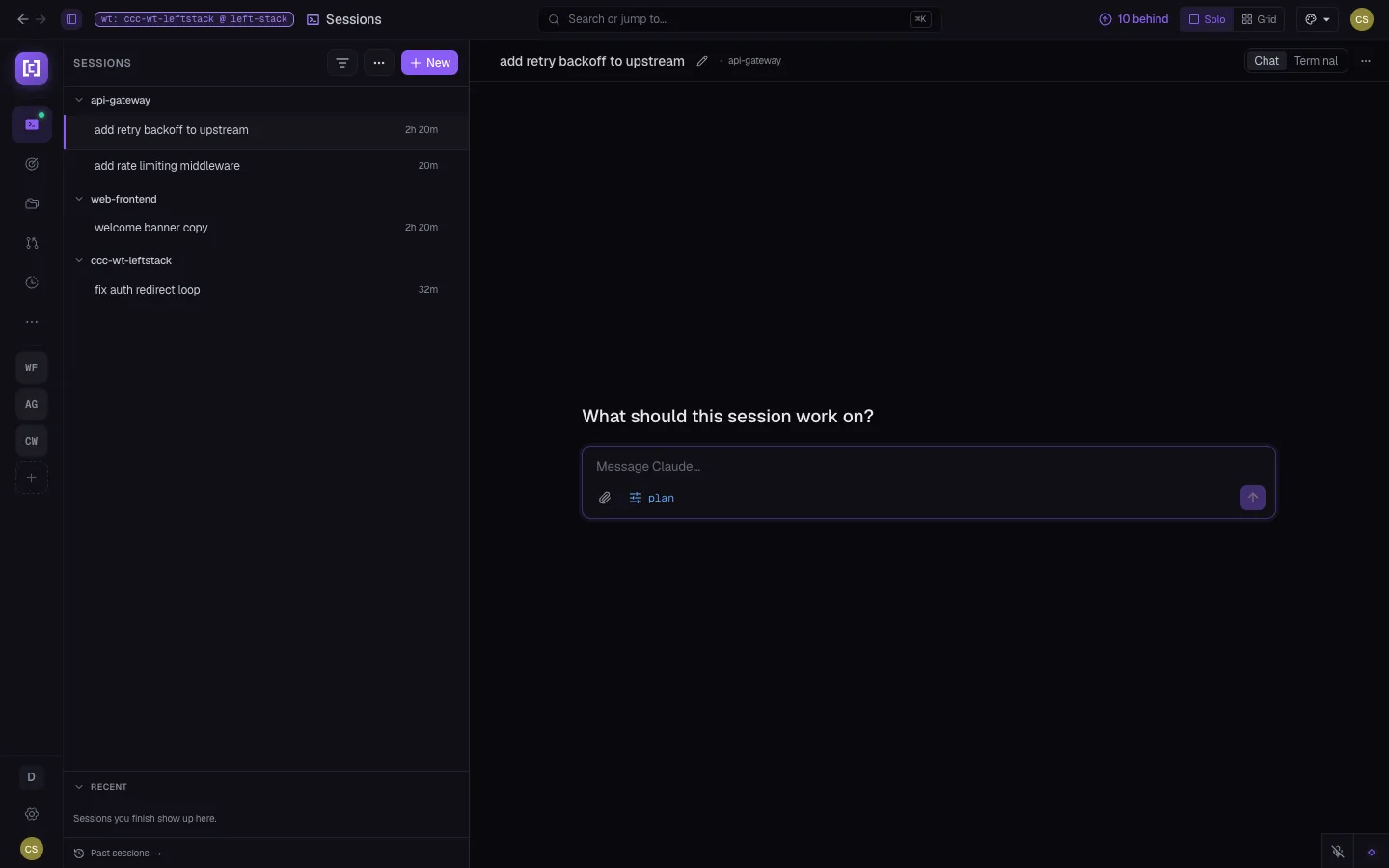
Sessions · Global Panel
Sessions everywhere. Nav decluttered.
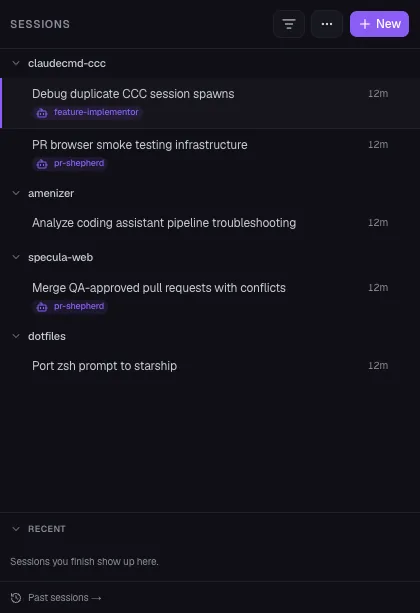
The sessions pane now follows you across every page — grouped under project headers, drag-reorderable,
collapsible. The 17-item sidebar nav shrinks to a 66px icon rail; rarely-used destinations move
behind a ⋯ More popover. An unread dot stays visible on a collapsed group so hidden work still
announces itself.
Always docked Grouped by project 66px rail nav
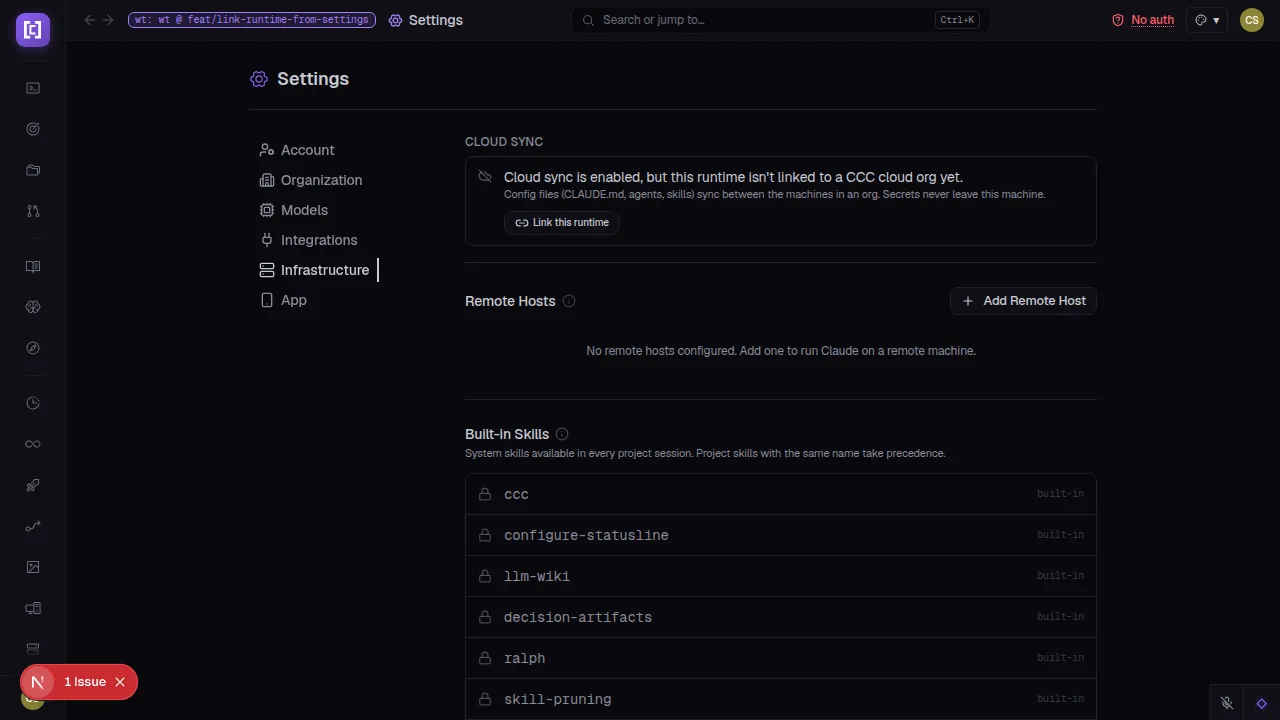
cuttle.run/settings/infrastructure
Before linking — the Cloud Sync panel shows the runtime's state and a single button to start
the link flow from the browser, no terminal needed.
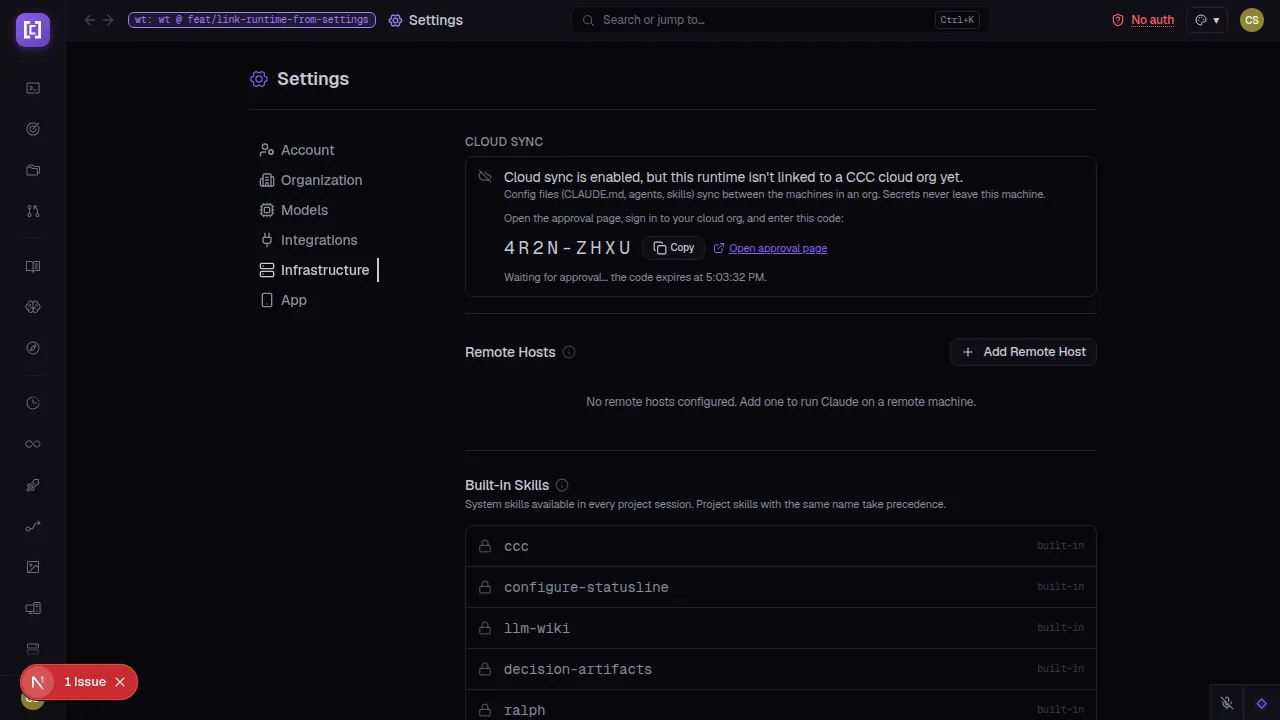
cuttle.run/settings/infrastructure
Pairing code — a large code appears inline with a copy button and a direct link to the cloud
approval page; the server polls until approved.
cuttle.run/settings/infrastructure
Linked — org ID, queued changes, last push/pull, and a confirmation that the machine's
secrets key is now the org's escrowed DEK. Config files sync; secrets never leave.
cuttle.run/sessions/plan-card-demo
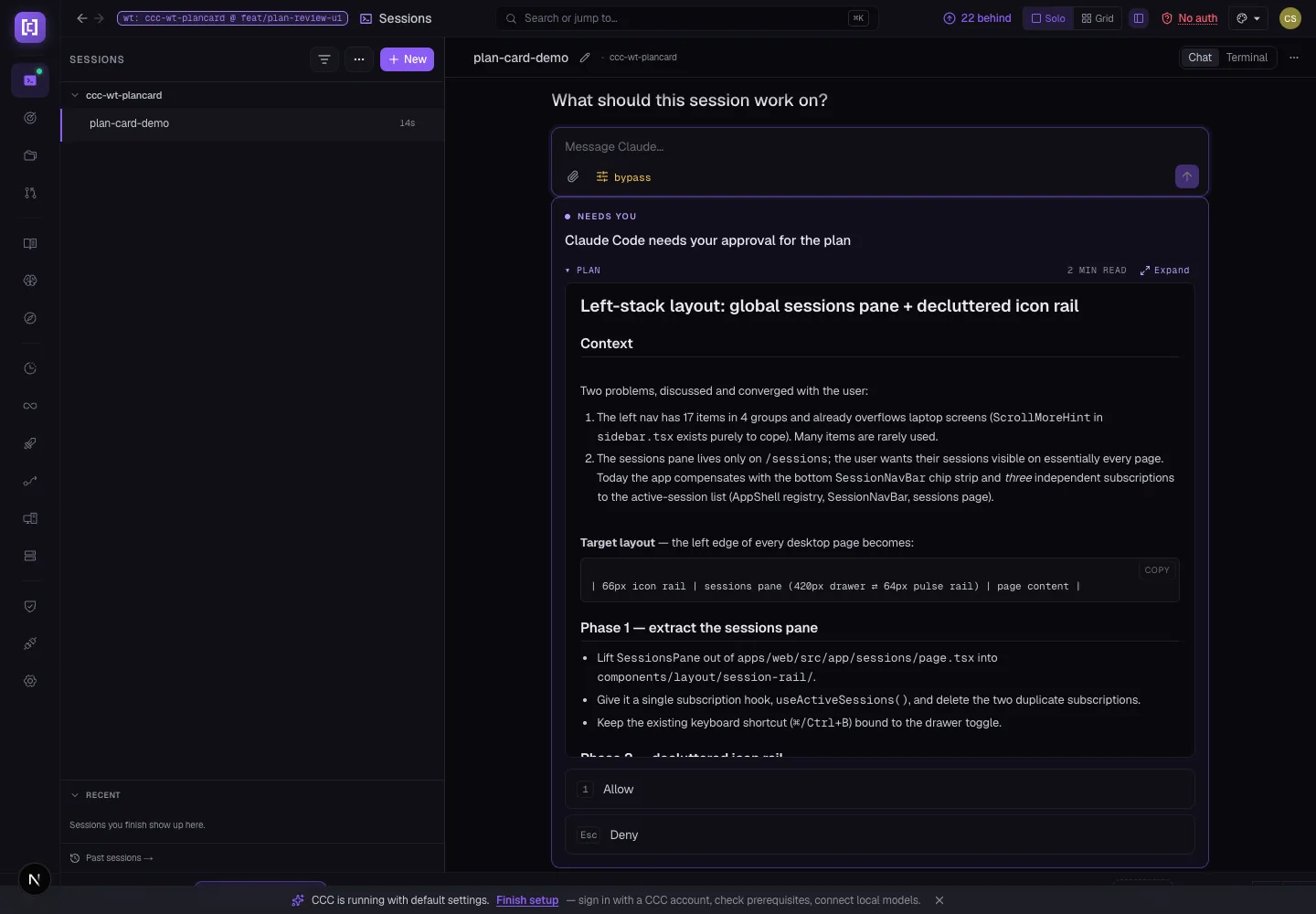
Plan in the card — the full plan renders above the approval options. Context, steps, and risks
are readable before you decide.
cuttle.run/sessions/plan-card-demo
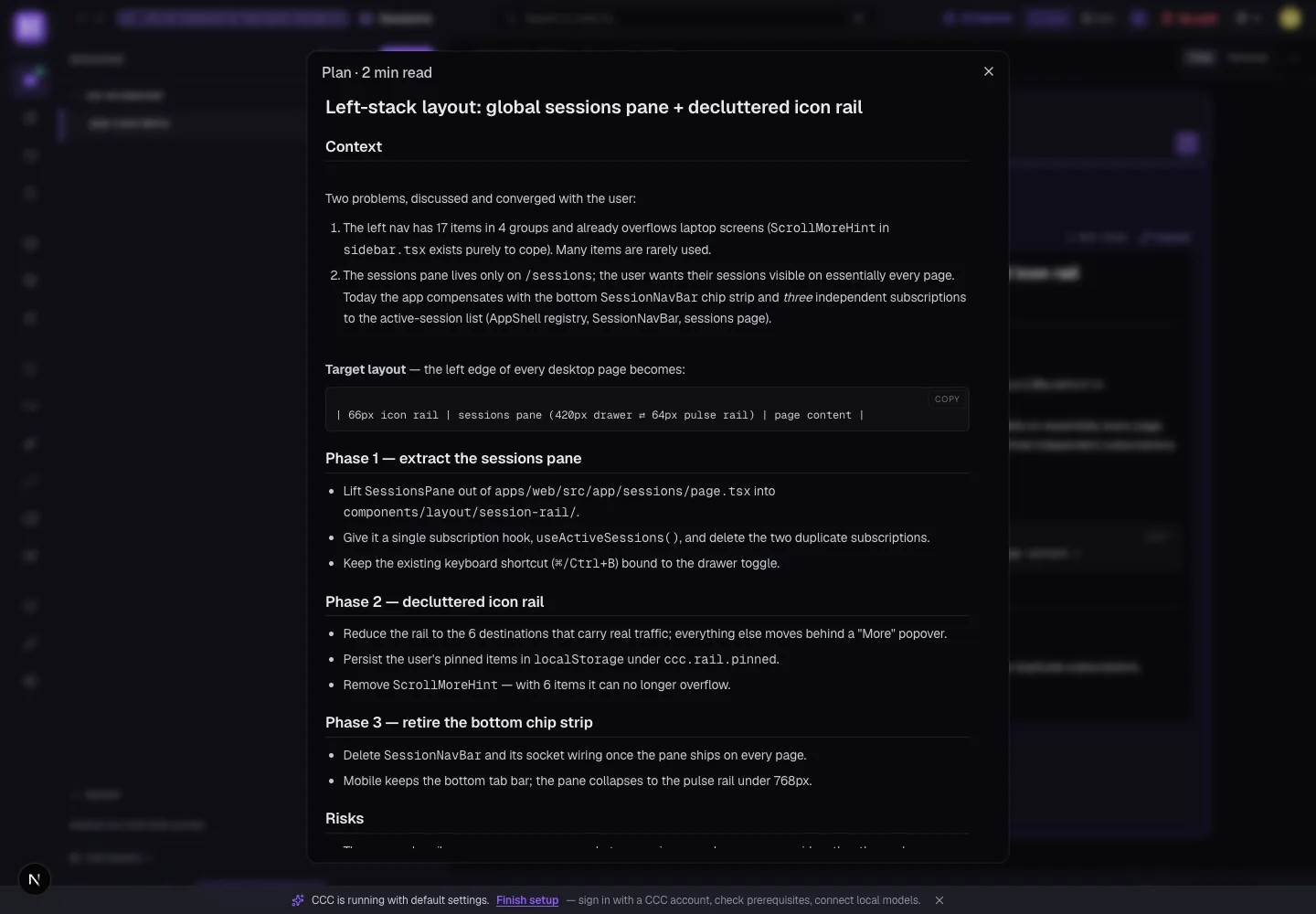
Expanded modal — Expand opens a full reading surface for longer plans; the modal can scroll
without the chat behind it moving.
cuttle.run/sessions/pip-demo
Chat pop-out — one click detaches the chat into a floating always-on-top window. Click again
to bring it back. Works across apps and macOS Spaces; no Electron changes needed.
cuttle.run/sessions
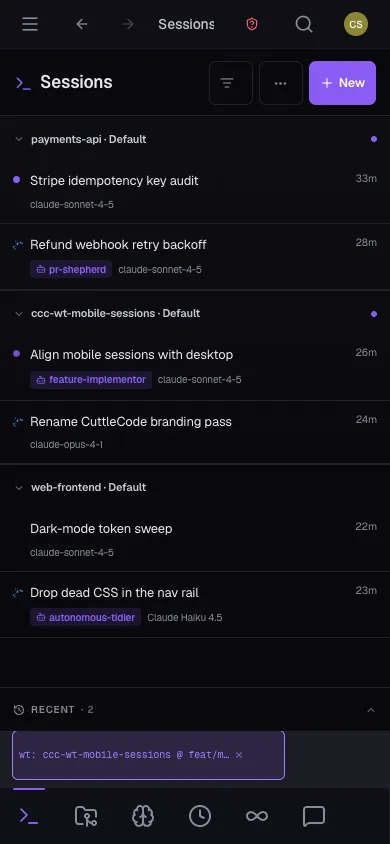
Desktop panel — projects collapse, drag to reorder, unread dots on headers.
cuttle.run/sessions
Mobile — same grouped layout on a phone screen, with a Past Sessions sheet and Intents in the
bottom nav.
This cycle CuttleCode gained its own name, launched a cloud identity layer with encrypted org secrets, shipped ten phases of Intents in
three weeks, made sessions survive server restarts, docked the sessions pane on every page with a project-grouped view, and closed 203 bugs —
all while keeping macOS installers signed, notarized, and auto-updating.
Twelve more capabilities that landed quietly this cycle.
Chat
Live Subagent Status
Running subagents now report their live progress directly in the chat view. The Agent row grows a per-agent status line — current tool, file, elapsed time — that updates as the subagent works, so there's no need to switch to the terminal to know what a background agent is doing.
Admin
Diagnostics Tab — Machine Health
A new Admin › Diagnostics tab surfaces host RAM, swap, CPU load, disk, event-loop delay, and cgroup slice pressure for the worktree and PTY daemon slices. A one-click 'Reclaim idle worktrees' action clears the leading cause of daemon throttle without a terminal.
Cloud
Linked-Device Management
The Cloud workspace dashboard shows every device linked to an org and lets an admin revoke one — revoking deletes the device's Supabase session so access ends at the next token refresh, not just at the next slot check. Free accounts support three linked devices.
Intents
Per-Intent Base Branch
Each intent can now declare its own base branch for PRs and worktrees, overriding the project default. Teams running multiple long-lived feature branches can pin the right base per story without touching project settings.
Ralph
Per-Iteration Usage + Live Fleet Badge
Ralph runs expose per-iteration token and cost figures via a new endpoint. The Ralph sidebar badge now drives from a live fleet feed rather than a poll — the count updates the moment a run starts or ends.
Chat
Plan Review Reading Surface
Plan-approval cards now include the full plan text above the approval options. An Expand button opens a full reading modal — context, steps, risks — so operators never have to approve something they couldn't read.
Mobile
Sessions List — Desktop Parity on Phone
The mobile Sessions screen now renders the same grouped-by-project layout as the desktop panel, including collapsible project headers, unread dots, and a Past Sessions sheet pinned to the bottom nav.
Agents
Roomier Agent Wizard
The agent creation and edit wizard now has an expandable system-prompt field — the textarea grows as you type and can be opened full-screen. The previous fixed-height box cut off prompts longer than a few lines.
Sessions
Infinite-scroll Past Sessions
The sessions panel's Past Sessions section now loads older sessions on scroll. Previously the list was capped at a fixed batch; long-running installs with hundreds of sessions could not reach work from earlier in the week.
Repos
Auto-sync Registered Checkouts
Repos registered in a project now fetch and fast-forward their default branch automatically in the background. Sessions that start from a registered checkout always start from the remote tip, not a stale local ref.
Install
One-click Tailnet Install Command
The Install page generates a copy-paste install command pre-populated with the instance's Tailscale address. Previously operators had to look up the address, substitute it manually, and handle apostrophes in machine names that broke shell quoting.
Discover
Plain-English Feature Pages
Every feature in the Discover section now carries a 'What is it' blurb and a use-cases list written in plain language. The previous grid was a link index with no explanatory copy — a new operator had no way to know what each item did without navigating into it.
04 / Under the hull
The unglamorous 80%.
Behind the headline launches, this cycle closed 203 bugs. The chat renderer received over fifty
targeted fixes: markdown lists, blockquotes, strikethrough, inline images, GIF-to-video URLs,
capped tool output expanders, AskUserQuestion batching, thinking-block expanders, and @-mention
file attachments all render correctly. PTY edge cases — stray Enters into live TUI dialogs,
phantom "Working" states from hook timing, process-tree kill on macOS — are eliminated. Cloud
auth: PKCE storage, SMTP email confirmation, first-admin claim, device-link handoff, and the
SSO redirect from the callback are each fixed in isolation. Pipeline nodes no longer
force-succeed while their agent is blocked on a question. Session resume revives the same session
instead of duplicating it. Every fix removes a class of failure, not a single instance of it.
 Restart